
![[Guide] How To Choose & Evaluate Field Service Software](https://cdn.prod.website-files.com/67ae6e3fa71598c124af0f8b/6a4727b7109639af195d6624_Choose%20FSM%20Software%20Guide%20(1).webp)
You’ve seen the return on investment (ROI) that field service management software (FSM) can bring to your business. How do you actually choose among all the different options?
And if you run an HVAC, plumbing, or electrical shop with 5 to 20 techs, you already know the stakes. The software you choose touches every part of your day, from how dispatch builds the schedule to how fast you get paid once the job is done.
This guide walks you through the main features, processes, and support that a software platform can offer and that you’ll need to map to your own organization’s priorities. Let’s dive in!
Understanding Core Features That'll Drive Growth
In short, when it comes to choosing an FSM software, it ultimately comes down to the feature sets that are offered and how that’ll impact your business.
Some software supports one-person businesses, while others, like ServiceBox, are built for businesses with 5+ technicians, for mid-market growth.
But at its core, you’ll need software that can support the streamlining of administrative work and handle those field service workflows, from quote to payment, with CRM details, inventory management, and dispatch, all built in. That is the real engine behind growth: more jobs handled with the same crew, fewer dollars left on the table, and a clearer picture of where your business actually stands. Keep that lens on as we get into how to match a platform to your specific operation.
How to Evaluate Field Service Software Specific to Your Business Needs
Before you sit through a demo, get honest about where your business is today and where it is headed. Here is how to size up a platform against your own operation.
Employee count and revenue levels
Start with your team size and what you are bringing in. A shop running 5 techs has different pain points than one running 20, and the software should match. Smaller teams usually want something they can set up fast without a dedicated office admin babysitting it.
Larger teams need user roles, permissions, and reporting that keep everyone in their lane.
How ServiceBox Handles This
We built ServiceBox to run the same whether you have a handful of techs or a full dispatch board, and our plans are priced per user with a clear monthly rate, so you can see what another seat costs before you add it.
Residential or commercial
If you run a residential service business, your work is high-volume with a heavy focus on quick quoting and getting paid on the spot. Your field service software needs to support these fast-moving details with technicians completing multiple jobs per day or week.
If you focus on securing more commercial accounts, you’ll need more complex software that handles multiple jobsites per customer, recurring work orders, and contract-based maintenance without a clunky workaround.
How ServiceBox Handles This
ServiceBox was built for both sides of the fence. For commercially focused FSM companies, each work order maps to your specific job sites, and recurring maintenance contracts, purchase orders, and price books are built right in. For residential crews, a tech can build a quote on the phone at the kitchen table, turn it into a work order with one click, and collect payment on-site.
Current processes and software
In your field service business, whether you run an HVAC or plumbing company, manual processes create headaches. Random spreadsheets, technician notes on paper, and missed emails all add up.
Make sure your current processes can be captured by the software you choose. Some only offer part of the picture when it comes to process automation, such as inventory management. However, you’ll want software that syncs across all your processes so you’re using the software for maximum efficiency.
The goal is not to blow up everything that works. It is to replace the parts that are slowing you down while keeping the rest intact.
How ServiceBox Handles This
The great thing about ServiceBox is our deep financial integrations. If your books live in QuickBooks or Sage, ServiceBox connects to QuickBooks Online, QuickBooks Desktop, Sage 50, and Sage 300, so customers, invoices, payments, and timesheets move back and forth without anyone rekeying them. Your admin team saves time on reconciliation; follow-ups are automated, and you’ll reduce your AR turnover in weeks.
Flexibility needs
Every shop has its quirks, and your software should bend to fit them rather than the other way around. Maybe you run custom checklists for safety compliance. Maybe your pricing has tiers, or you need certain fields hidden from customers on a quote. Maybe half your crew works off tablets and the other half off phones.
Ask how much you can set up yourself without having to call support every time. Things like custom fields, user permissions, checklist builders, and quote print options separate a platform you can mold to your business from one that boxes you in. The more your software flexes to match how you already work, the less retraining you'll need on day one.
How ServiceBox Handles This
With ServiceBox, you can customize work orders, checklists, and other steps that your trade actually needs. For a quote, you can show or hide the price breakdown based on what you want the customer to see, and duplicate a quote when the pricing is repeated. Notes, to-dos, and jobsite photos attach right to the work order, so every job carries its own paper trail.
Future growth plans
As with any new tool or addition to your business, consider your future growth plans. Are you looking to add new technicians? Hone in on more profitable jobs? Or, simply get more time back in your day? Switching platforms is painful, so it pays to pick one that has room to grow.
Look for a platform built to scale from a handful of techs to 100 or more, with the features you will need waiting for you when you get there. That way, you set it up once and grow into it, instead of starting this whole search over in eighteen months.
How ServiceBox Handles This
We have spent over 12 years building specifically for field service, and we serve shops from around 3 techs up to 100, so there is room to scale as you add crews and locations. When you are ready for more advanced needs like inventory tracking, multiple locations, and purchasing, they are already available in our Premium plan.
Top Field Service Software Features That You Need To Have for 2026/2027
When it comes to evaluating your needs, sometimes you don’t know what you don’t know. Which is why we want to share the most important features you should look for in the FSM software you choose!
Tip: ServiceBox offers all of these amazing features. Book a demo today.
Overall workflow automation
Good FSM software connects these steps so information flows from one to the next without anyone rekeying it.
A quote becomes a work order with a click. From there, the inventory that’s in the quote is accounted for, and your technician can complete the work without delays. From there, completed work and logged time flowed straight into an invoice. When you are weighing platforms, follow a single job from quote to cash and count how many manual handoffs are left. The fewer, the better.
Scheduling and dispatch
It’s not just technicians you need to empower. Your dispatch team also needs the right tools and software to avoid double bookings and push schedule updates straight to the crew's phones.
When a cancellation opens a slot or an emergency call comes in, your dispatcher should be able to fill that gap in seconds. Which is where software comes in. Saving your team hours over a week from manual scheduling requirements.
Recurring work orders and preventative maintenance contracts
If you work in commercial HVAC, plumbing, or electrical, recurring work orders and preventative maintenance are the bread and butter for your business. So, making sure that recurring revenue never falls through the cracks because a job was forgotten, and locking in steady, predictable work that keeps your crew busy on your important clients, without additional administrative work.
Inventory management and alerts
Low stock can delay any job and its subsequent payment. With proper inventory management and reordering alerts, you’ll never fall into this trap.
When inventory ties into your jobs and invoicing, you stop eating the cost of potentially unbilled materials and prevent your techs from going back to job sites for simple parts management.
Making a Final Evaluation & Decision
By now, you should have a good idea of what your business needs, and how FSM software can level up your business. The last step is turning all of that into a decision you feel good about. Here is a simple way to compare your options side by side and avoid buyer's remorse.
Using a simple evaluation matrix
If you don’t want to jump into a demo right away, we highly recommend spending time using a scoring matrix to evaluate your software needs.
Begin by listing the features and factors that matter most to your shop down one side, give each one a weight based on how important it is, then score each platform from 1 to 5. Add it up, and you have an honest, apples-to-apples comparison instead of a gut feeling.
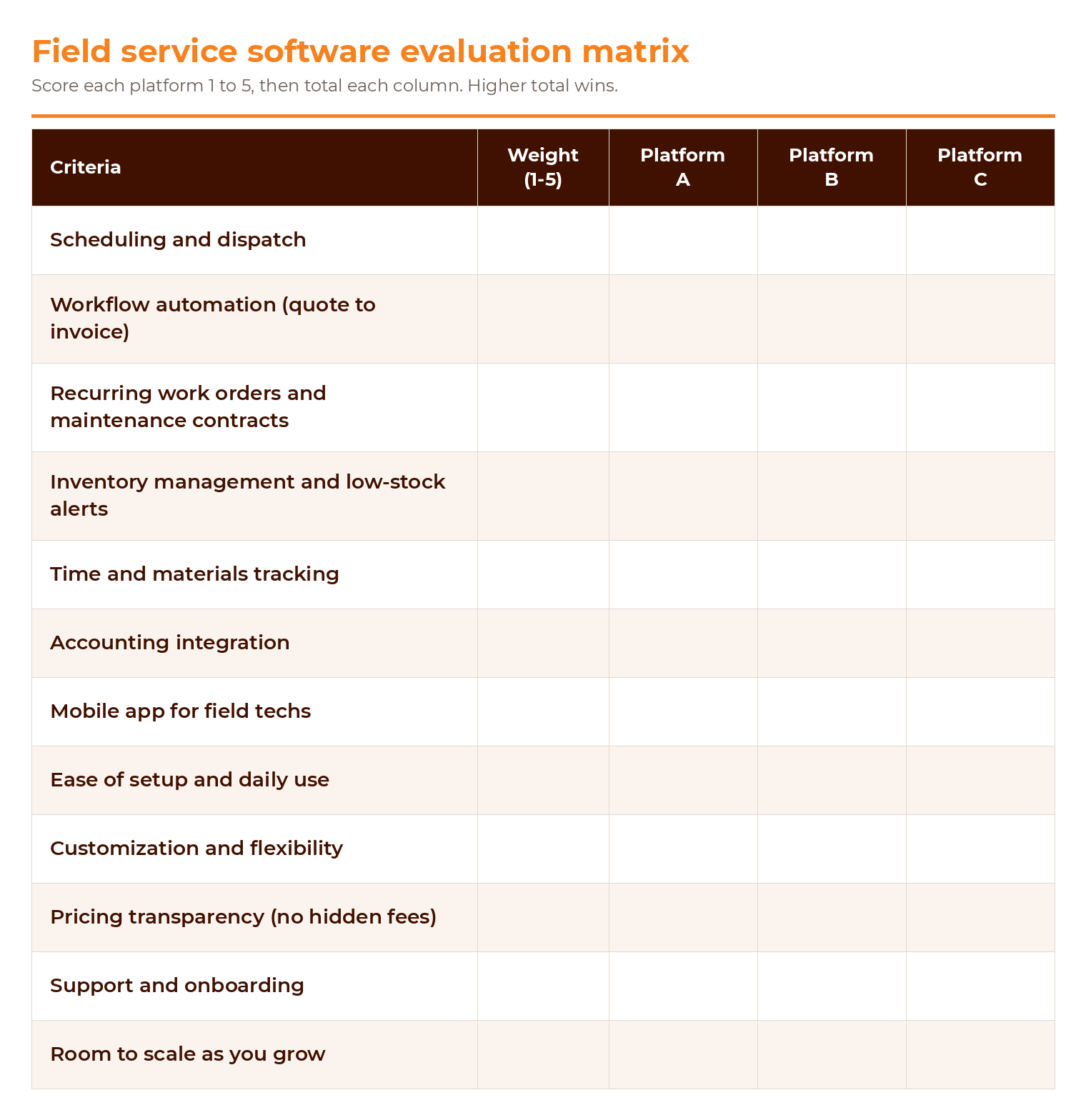
Here is a starter matrix you can adjust to fit your operation:
Questions to ask on every demo call:
- Can you walk one job from quote to invoice so I can see every handoff?
- How does scheduling handle a last-minute emergency call or a cancellation?
- Can I set up recurring work orders for my maintenance contracts?
- How does pricing change as I add techs, and are there any setup or hidden fees?
- Can my accounting software connect to this?
- Can I control what techs see and do on their phones?
- What does support look like after we sign, and is onboarding included?
What'll fit your future organizational growth
The cost of switching software down the road is steep. You retrain your team, migrate your data, and lose momentum while everyone adjusts. Picking a platform with room to grow means you set it up once and build on it, rather than going through this whole process again the next time your business levels up.
A platform can win on today's needs and still be the wrong long-term pick. As you score your options, weigh how each one handles where you are headed.
Always consider support capabilities
So before you sign anything, ask how support works. Is there a real person you can reach, or just a help article? How fast do they respond? Is onboarding included to get your team up and running? A platform with strong, responsive support and solid onboarding is worth more than a slightly cheaper one that leaves you on your own. That backup is what keeps a software hiccup from turning into a lost day in the field.
Final Thoughts
Choosing field service management software comes down to knowing your own field service business. And, the wrong platform will create more headaches in 6 months than it solves; while the right one handles the busywork, helps your crew run more jobs, and gets you paid faster, and ultimately boosts morale.
If you want to see how field service software can uplevel your HVAC, plumbing, or electrical business, book a demo today.

![How to Schedule Visits for HVAC Systems [Seasonal Maintenance Guide]](https://cdn.prod.website-files.com/67ae6e3fa71598c124af0f8b/6ab5b39ad7006a6e8dd23304_Dispatch%20team.jpg)