
Schedule
Prioritize service demand and match the right HVAC technician to each call.
HVAC business software for commercial service teams
ServiceBox is Canadian-built, all-in-one HVAC software for commercial contractors. Bring maintenance agreements, scheduling, dispatch, equipment history, work orders and invoicing together, with integrations for QuickBooks and Sage 50 Canada. It also fits Canadian plumbing and heating companies that manage HVAC, hydronic, boiler and plumbing service across the same customers and sites.
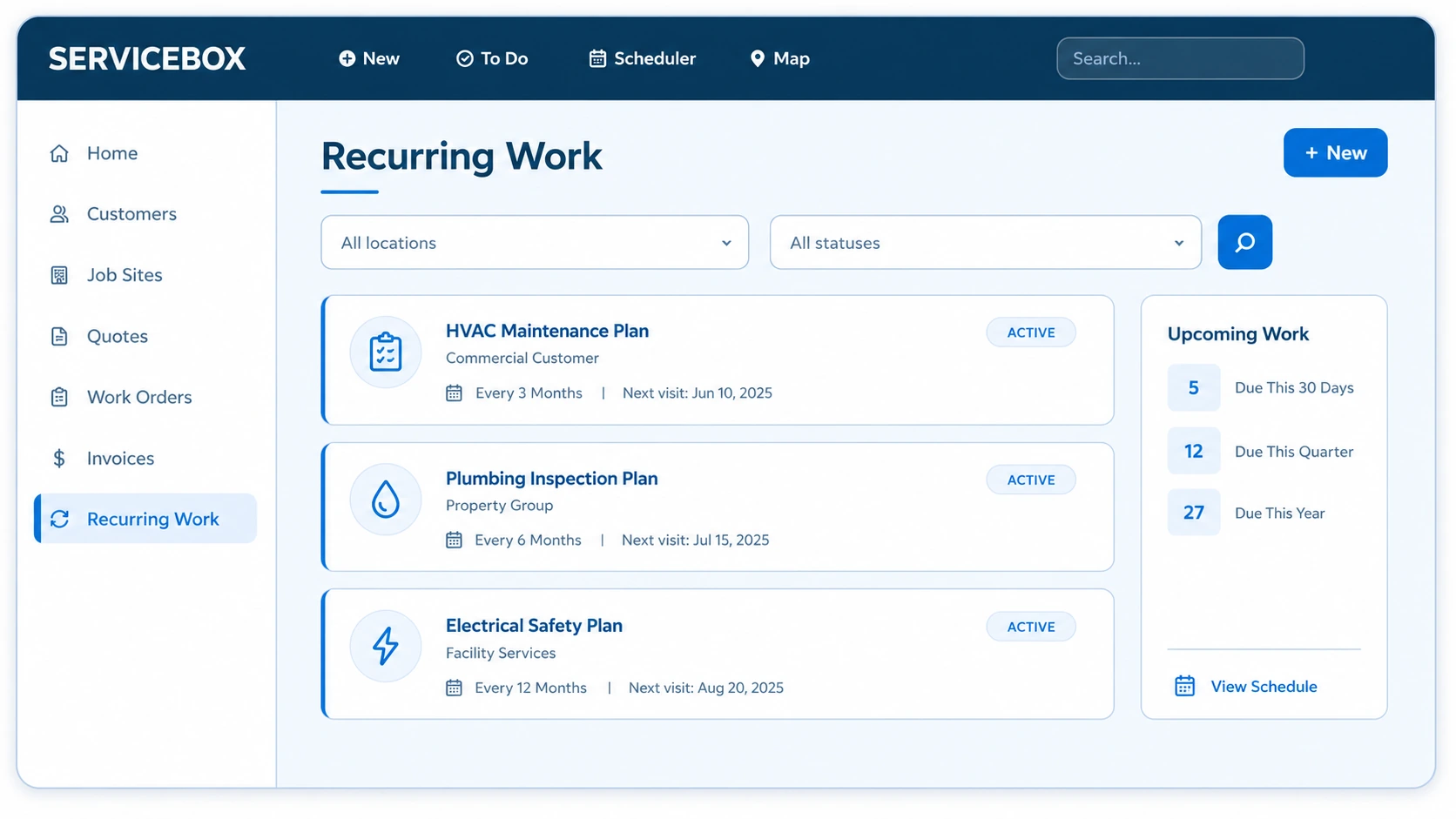
HVAC field service software
For commercial HVAC contractors, the best HVAC field service software should connect customer, job-site and equipment history with scheduling and dispatch, work orders, recurring maintenance, technician documentation, job costing, invoicing and accounting workflows. ServiceBox connects those workflows in one HVAC business software platform.
Explore field service work order software, scheduling and dispatch, and preventative maintenance.
For accounting details, see the QuickBooks Online field service integration.
Prioritize service demand and match the right HVAC technician to each call.
Give the field customer, job-site, equipment and service history before arrival.
Record labour, materials, readings, forms, notes, photos and recommendations.
Review a complete HVAC job record before invoicing and accounting handoff.
From maintenance agreement to approved work
Keep contracted maintenance, equipment history, technician findings, recommended work, quotes, repairs or replacements and billing connected instead of losing the next action in the handoff.
Keep model, serial, prior repairs, readings and open recommendations attached to each unit before the next visit starts.
Generate recurring HVAC work orders with the correct customer, site, equipment, scope and checklist from the maintenance agreement.
Move technician findings and recommended repairs into follow-up quotes, replacement projects and billing without rebuilding the job.

Full Throttle used ServiceBox HVAC business software to connect scheduling, customer records, quoting, work orders and field communication while growing its operation.
HVAC customer storyFrom 3 trucks to 11See how Full Throttle connected scheduling, CRM, quoting, work orders and field communication as the team grew.
Read the Full Throttle case study →A commercial HVAC lifecycle
The technician opens the work order with the building, RTU, prior history, contracted scope and checklist attached. Readings, time, materials, photos and findings return on the same record. When follow-up work is needed, the office can carry that context into a quote, approved repair or replacement project and billing.
Start with the maintenance agreement, RTU history, prior repairs and open recommendations.
Complete the PM checklist and capture readings, photos, materials, deficiencies and recommended follow-up work.
Review the field record, prepare the next quote or repair, and keep the resulting work connected through costing and billing.
The commercial HVAC record
Commercial HVAC software creates value by preserving site, equipment, field and commercial context—not by replacing paper with an isolated digital form.
Keep serials, prior work, readings, photos and recommendations attached to every RTU, boiler and HVAC unit.
Generate the correct frequency, checklist, expected work and technician assignment from each HVAC maintenance agreement.
Return time, materials, readings, forms, photos and customer-ready HVAC documentation from the field.
Built For Canada
ServiceBox is Built For Canada, shaped around the day-to-day realities of commercial service businesses. That means workflows built for customer sites, equipment history, recurring service, field teams, invoicing and Canadian accounting—not a generic US-first system your team has to work around.
See why ServiceBox is Built For Canada →.webp)
From commercial HVAC and plumbing to electrical and multi-trade teams, ServiceBox connects the full service workflow while supporting Canadian needs like Sage 50 Canada handoffs and human implementation support.
One system for the real work mix
ServiceBox keeps planned commercial maintenance, urgent service, quoted repairs and replacement work connected while still supporting residential service and installation workflows in the same system.
Dispatch urgent HVAC work with customer, building, equipment and service history already in hand.
Generate seasonal and contracted HVAC visits with the correct equipment, scope and checklist.
Turn documented HVAC findings into quoted repairs or replacement scope, then carry approved crews, materials, purchase orders, job costs and billing through completion.
Better service for your customer
Connected HVAC information supports better customer service by helping teams answer faster, document work clearly and follow through on maintenance, repairs and replacements. Clear customer communication and service history help commercial clients get more consistent answers and support customer satisfaction.
Give property managers clear service history without calling the technician.
Deliver the scope promised across every building and unit.
Support repair and replacement decisions with evidence from the equipment record.
Validated by ServiceBox customers
“ServiceBox is an excellent product, making it easy for management and technicians to keep everything organized and efficient.”
“It has proven easy for our technicians and admin team to utilize, and our customers get a great end product too.”
ServiceBox is easy to use, highly configurable and supported by a friendly team that continues to check in.
Guided adoption
An onboarding specialist configures ServiceBox around the HVAC business, then trains office, field and accounting roles on the workflow they own.
Connected HVAC software features
Across the HVAC industry, field service management software needs to connect customer management, job scheduling, dispatch, work orders, service agreements and job costing. ServiceBox brings those HVAC field service management workflows into one platform. Commercial HVAC contractors can follow customer information, job data and equipment records from the initial service call through maintenance, approved repairs, invoicing and accounting instead of rebuilding customer details through duplicate data entry.
HVAC workflow guides: HVAC dispatch software guide, HVAC scheduling software guide, and HVAC work order software guide.
Generate recurring HVAC work orders, standardize PM checklists and protect contract renewal revenue.
Explore preventive maintenance agreement software →Technician capacityPlan technician capacity, prioritize emergency calls and send complete job details to the field.
Explore scheduling and dispatch →Connected field teamsGive technicians work orders, unit history, checklists, photos, signatures and time tracking on supported devices. This mobile functionality keeps job details available in the field and supports technician productivity without separating the office and field record.
Explore mobile connectivity →Parts visibilityTrack HVAC parts across warehouses, service vehicles and jobs with usage and cost visibility.
Explore inventory management →Vendor controlCreate vendor orders, receive parts, update inventory and assign equipment or job costs.
Explore purchasing software →Faster cash flowTurn approved HVAC quotes into work orders and prepare accurate invoices from complete field records, creating a clearer path from completed work to billing and cash flow.
Explore quoting and invoicing →HVAC software questions contractors ask
HVAC field service software helps HVAC companies manage customers, scheduling, dispatch, work orders, field documentation and billing. For commercial service teams, it should also preserve equipment history, maintenance contracts and work across multiple customer sites. When HVAC contractors compare HVAC software providers and HVAC software solutions, useful capabilities to evaluate include customer relationship management, service management, a mobile app, inventory management, job costing, HVAC invoicing software, payment processing and QuickBooks integration. ServiceBox connects its supported workflows so office staff and technicians can work from the same job record rather than separate spreadsheets.
Yes. ServiceBox supports recurring maintenance, urgent service calls, quoted repairs, retrofits, replacements and installation work. Approved scope can move into work orders with schedules, labour, materials, purchase orders and job costing, followed by staged or final invoicing. Commercial HVAC software should keep that project work connected to the customer's site and equipment history, so the next technician can see what was installed, repaired or recommended.
HVAC scheduling software helps the office plan technician capacity and when work should happen. Dispatch software handles assignment, sending current job details to the field, and changes as the service day unfolds. ServiceBox connects both functions while keeping the dispatcher in control.
Yes. ServiceBox supports QuickBooks Online integration, as well as QuickBooks Desktop and Sage 50 Canada. Supported invoices, payments and other records can move through the configured accounting connection. ServiceBox handles the operational job record while accounting software remains the financial system of record. During onboarding, confirm customer and job-site mappings, which transactions transfer, and who owns payment entry. The connection does not mean every record synchronizes in both directions.
The ServiceBox mobile app gives HVAC technicians access to work orders and customer, site and equipment history on supported devices. Technicians can capture time, materials, notes, photos, checklists, readings, forms and customer sign-off. Those job details give the office a clearer basis for follow-up work, payroll, job costing and invoicing. Confirm the devices, permissions and field workflow your team needs during the demo and technician training.
The right software depends on how your contractor business manages equipment, service intervals, technician assignments, and follow-up repairs. ServiceBox supports commercial HVAC maintenance through recurring work orders, equipment and job-site history, checklists, field documentation, scheduling, and billing workflows.
Look for software that connects agreement coverage, customer locations, equipment, planned service visits, completion records, and renewal follow-up. ServiceBox brings those records into a connected workflow, while your team remains responsible for reviewing exceptions, approving additional repairs, and managing customer commitments.
No generic product tour
Walk through the way your team handles service, maintenance, quoted work and billing—and see how ServiceBox connects it.