
Crew scheduling
Plan technician capacity and multi-day assignments without rebuilding the schedule.
Electrical business software for commercial contractors
ServiceBox is Canadian-built, all-in-one electrical contractor software for commercial service teams. Connect scheduling, work orders, labour, materials, job costing and invoicing, with integrations for QuickBooks and Sage 50 Canada.
Croft Electric: a 30+ person field operation using ServiceBox — read the customer story →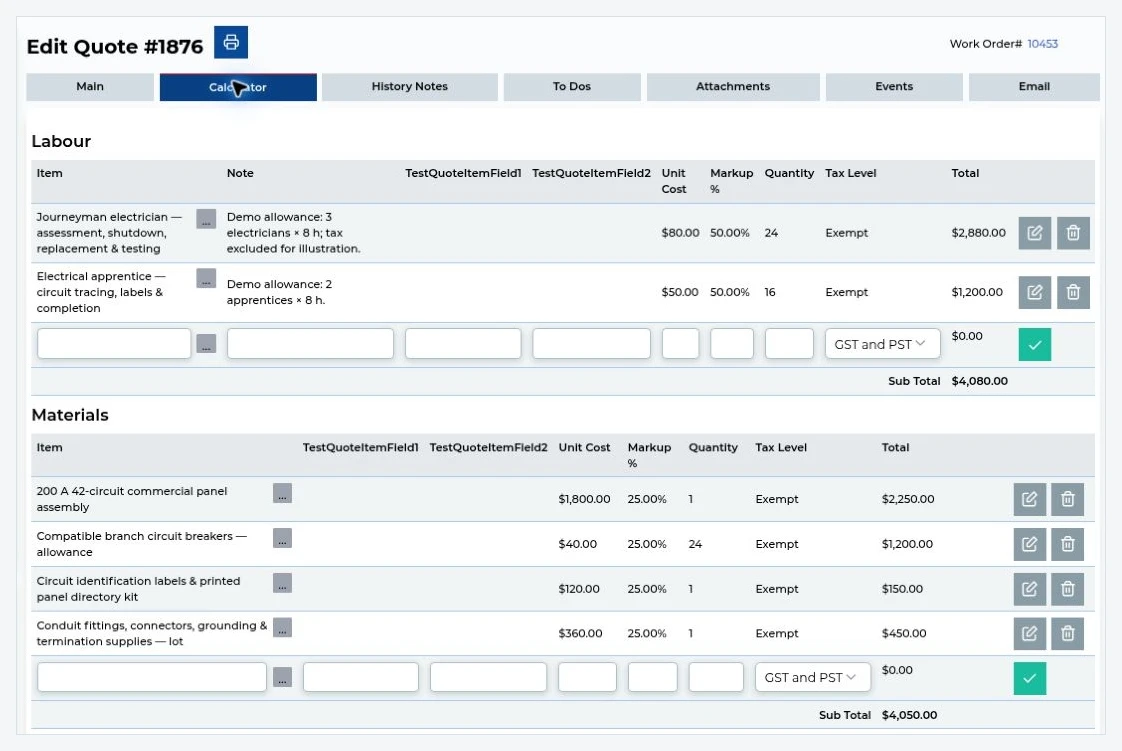
Electrical contractor software
For a commercial electrical contractor, the right software should handle the work mix you actually run: urgent service, recurring maintenance and longer project work. ServiceBox keeps customer and job-site records connected to scheduling, work orders, electrician time, materials, purchasing, job costing and billing. The office can schedule the work, electricians can update the same record in the field, and billing can use the completed job record instead of rebuilding it later.
Explore preventive maintenance software for commercial contractors →
See ServiceBox quoting and invoicing software and electrical job management.For billing-specific guidance, see the electrical invoice app guide.
For dispatch-specific guidance, read our electrician dispatch software guide →For the accounting handoff, compare ServiceBox QuickBooks and Sage integrations.
See how ServiceBox handles electrical work order software for commercial service visits, technician time, materials and billing review.

Croft Electric uses ServiceBox electrical business software to connect a 30-plus-person field operation with scheduling, mobile work orders, time cards and faster billing.
Electrical customer storyA 30-plus-person field operationSee how Croft Electric connects scheduling, mobile work orders, time cards and billing workflows across field and office teams.
Read the Croft Electric case study →One system for both sides of the business
Your dispatcher can handle urgent calls and recurring work while project teams track crews, materials, purchasing, job costs and progress billing—without splitting the customer and site history across different systems.
Plan technician capacity and multi-day assignments without rebuilding the schedule.
Keep inspection forms, photos, notes, panel details and scope changes on the job.
Connect labour, materials, purchase orders and job costs before billing.
A familiar commercial electrical job
The approved quote becomes scheduled work. Electricians capture time, materials, photos, site notes and changes from the field while the office sees job costs and keeps progress billing moving.
Build the approved scope with labour, materials and exclusions.
Schedule the right electricians, phases, site contacts and safety requirements.
Capture time, materials, photos and changes from the field while the office keeps job costs and progress billing current.
Built For Canada
ServiceBox is Built For Canada, shaped around the day-to-day realities of commercial service businesses. That means workflows built for customer sites, equipment history, recurring service, field teams, invoicing and Canadian accounting—not a generic US-first system your team has to work around.
See why ServiceBox is Built For Canada →.webp)
From commercial HVAC and plumbing to electrical and multi-trade teams, ServiceBox connects the full service workflow while supporting Canadian needs like Sage 50 Canada handoffs and human implementation support.
One system for the real work mix
For low-voltage, structured-cabling and communications teams, see ServiceBox telecom field service software →
A troubleshooting call and a multi-day upgrade do not run the same way. ServiceBox lets your office manage both without forcing every job into the same process.
Dispatch faults, outages and urgent calls with customer, site and system history already visible.
Schedule inspections, generator service and repeat maintenance without rebuilding the job details every time.
Track crews, labour, materials, purchase orders, job costs, changes and progress billing through completion.
Validated by ServiceBox customers
“I love that everything is in one location & we've gone completely paperless.”
“The program is easy to navigate - very intuitive. Support team is great too.”
Guided adoption
An onboarding specialist configures ServiceBox around service calls, projects, labour, materials, permissions and accounting, then trains each role on its workflow.
Electrical management software features for commercial contractors
Explore the tools your electricians and office team use to schedule work, record job details and prepare invoices.
Plan electrician capacity, urgent service calls and multi-day project phases.
Explore scheduling and dispatch →Connected field teamsGive electricians work orders, site history, forms, photos, signatures and job updates.
Explore mobile connectivity →Labour visibilityCapture travel, job and labour time for payroll, job costing and billing.
Explore timesheet software →Material controlTrack wire, devices and parts across warehouses, service vehicles and jobs.
Explore inventory management →Vendor purchasingCreate vendor orders, receive materials and assign costs to the correct electrical job.
Explore purchasing software →Faster billingBuild consistent electrical quotes, convert approvals into work and bill from complete field records.
Explore quoting and invoicing →Collect paymentLet customers pay from the invoice or collect supported card payments in the field while keeping payment activity tied to the billing record.
Explore payment processing →Accounting handoffMove supported invoice and payment data into QuickBooks Online, QuickBooks Desktop or Sage 50 Canada according to your integration setup.
Explore accounting integrations →Questions electrical contractors ask
Electrical management software should connect service calls, projects, customer and site history, panel and equipment records, electrician scheduling, labour, materials, purchase orders, field documentation, quotes, job costs and invoices in one system.
Yes. ServiceBox can coordinate urgent service, planned maintenance, upgrades and construction projects with schedules, work orders, labour, materials, purchase orders, job-cost tracking and invoicing.
Dispatch can schedule electricians, prioritize service demand and send customer, job-site, work-order, scope and history details to the field before arrival.
ServiceBox supports accounting workflows with QuickBooks Online, QuickBooks Desktop and Sage 50 Canada so approved invoices, payments and other supported records can move into accounting.
Electricians can record labour, materials, notes, photos, completed checklists, forms and progress updates on the work order so the office has a current record for follow-up, job costing and billing.
Yes. ServiceBox keeps labour, materials, purchase orders, field notes, photos and approved changes connected to the electrical job so project status and costs remain visible before invoicing.
Electrical contractor software is business software built to help electrical contractors manage customers, job sites, scheduling, dispatch, work orders, field technicians, labour, materials, job costing, projects, quoting and invoicing. For commercial contractors, it should support both service work and larger electrical projects without separating the operational history.
Electrician software often focuses on day-to-day scheduling, dispatch, work orders and invoicing. Electrical project management software adds the needs of longer jobs, including phases, crews, material costs, purchasing, scope changes, job progress and project billing. ServiceBox keeps service and project work connected rather than forcing an electrical contracting business to maintain separate systems.
See it with your workflow
Walk through the way your team handles service calls, recurring work, larger projects and billing—and see how ServiceBox connects it.