
Keep the day visible
Access saved schedule information when technicians move through basements, mechanical rooms, rural sites and other low-connectivity areas.
Offline Mode Field Service App
Keep field teams productive when internet service is limited or unavailable with enhanced offline access to saved work orders, schedule information and signatures in the ServiceBox mobile app.
The operational outcome
Offline Mode extends the ServiceBox mobile experience into weak-signal and no-signal environments. Technicians can retain enhanced access to saved work orders, schedules and signatures, while improved syncing, session reliability and request recovery help the app handle unstable networks more smoothly.
Access saved schedule information when technicians move through basements, mechanical rooms, rural sites and other low-connectivity areas.
Open saved work-order information without depending on a perfect cellular or Wi-Fi connection at every job site.
Improved syncing, session reliability and request recovery reduce friction when a technician moves between connected and unstable network conditions.
Inside ServiceBox Offline Mode
Offline capabilities focus on saved work orders, schedule information and signatures. The broader mobile app still connects technicians to customer context, documentation, time, invoicing and payment workflows when connectivity is available.
Keep saved schedule information available when a technician enters a weak-signal or no-signal area.
The next assigned work stays easier to reference without calling dispatch for basic schedule details.
Open customer contacts, site notes, access instructions, equipment and service history from the job.
The technician arrives with the context previous visits already earned.
Open saved work orders and review the job information already available to the mobile app when connectivity drops.
Technicians can keep referencing core job information in locations where service is unreliable.
Add job photos, internal notes, documents and supporting files from a supported mobile device.
The office sees a clearer record of conditions, work completed and follow-up needs.
Complete required checklists and role-specific field documentation while the technician is still on site.
Important steps are standardized instead of being left to memory.
Record job time, travel, labour and supported check-in or check-out activity from the field.
Billable time reaches review with less reconstruction at the end of the day.
Update work-order status and receive schedule, dispatch or priority changes as the day moves.
Dispatch and technicians work from a more current view of the day.
Keep saved signatures accessible as part of the offline mobile experience when internet service is limited or unavailable.
Important completion evidence remains easier to reference in the field even through a dead zone.
Prepare supported invoice steps, review job information and collect payment information from the field workflow.
Completed work can move toward billing and payment without returning to the shop.
Use the updated ServiceBox mobile app on supported iPhone, iPad, Android phone and Android tablet devices.
Field teams get the offline improvements on the mobile devices they already use for service work.
Offline Mode in the field
Instead of treating Offline Mode as a separate experience, ServiceBox keeps the key mobile workflow familiar: sync while connected, carry saved work into low-connectivity areas, then reconnect when service returns.
Before the dead zone
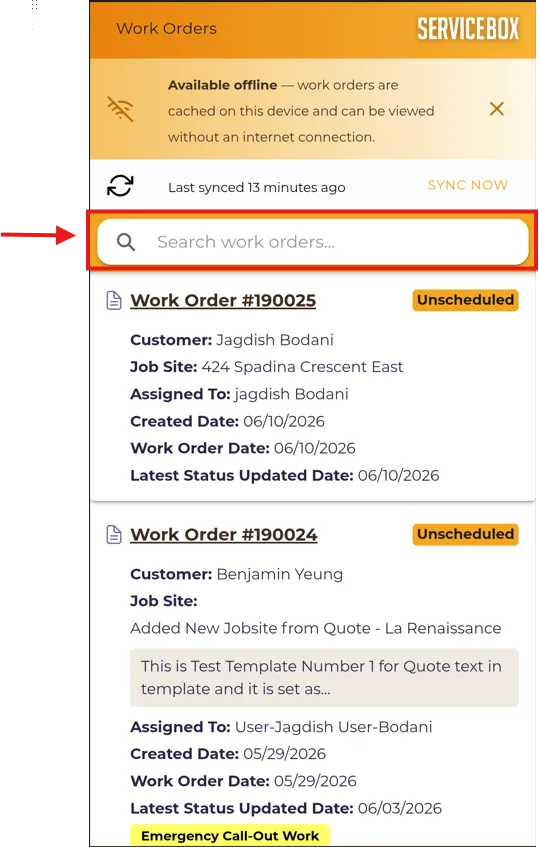
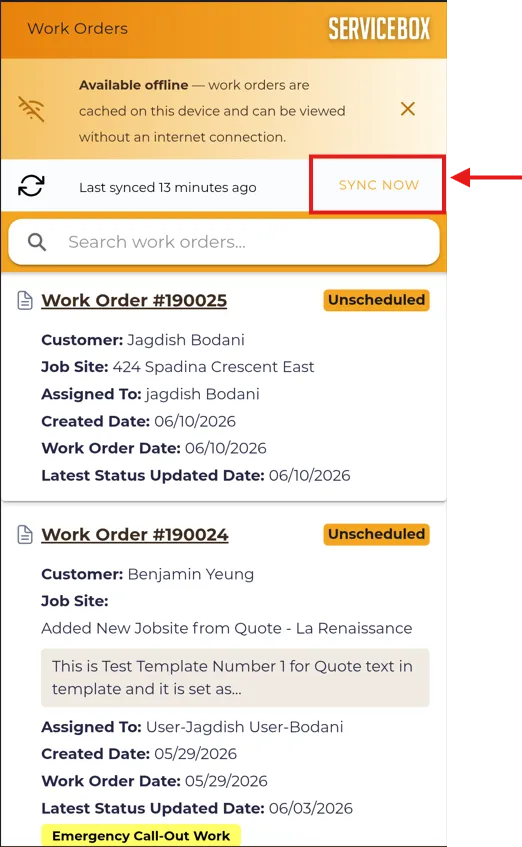
The Work Orders view shows when offline data was last synced and gives technicians a clear Sync Now action before they head into basements, rural sites, mechanical rooms or other weak-signal locations.
While connectivity is limited
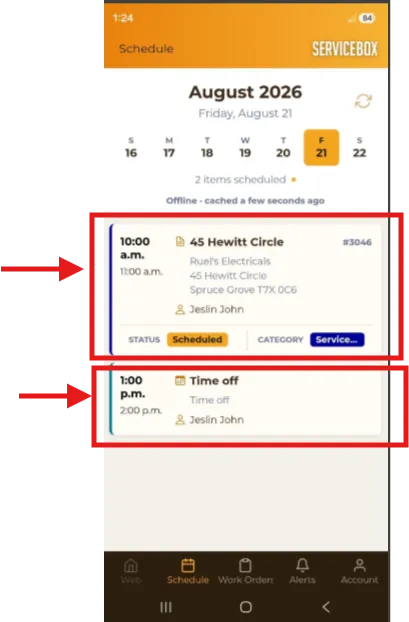
The Offline Schedule gives technicians access to the current week of work orders and events, helping them understand what is next without depending on a live connection for every schedule check.
One mobile experience
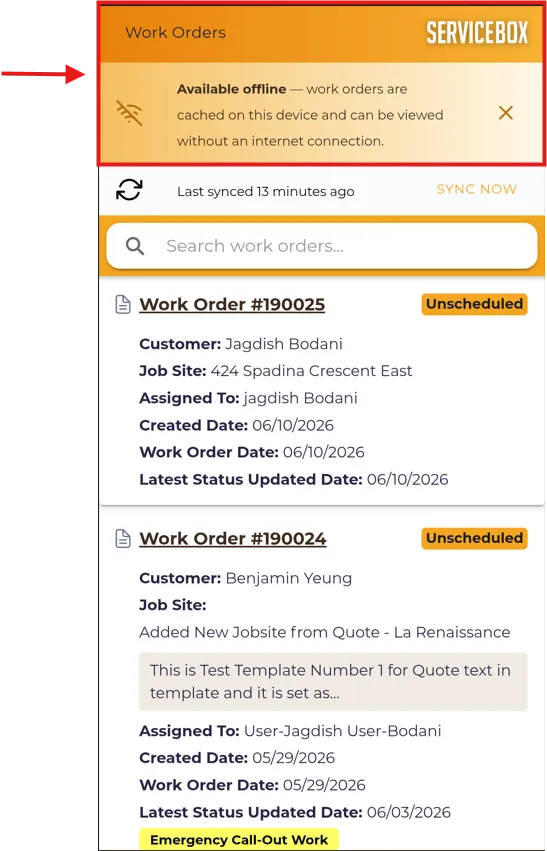
The refreshed mobile interface keeps the connected and offline experience in one place, so teams are not asking technicians to learn a separate tool just for low-connectivity jobs.
How it helps the business
Offline Mode reduces the operational impact of dead zones by keeping key saved information available and helping the mobile app recover more reliably when connectivity changes.
Technicians can reference saved schedule and work-order information without immediately calling dispatch when a job site loses service.
The mobile workflow is better prepared for interrupted connections, so technicians can move between job sites with less disruption from network changes.
Improved syncing, session reliability and request recovery help reduce friction when the device reconnects after unstable service.
Field staff can keep key saved job information close at hand instead of assuming every basement, rooftop or rural site will have reliable internet.
One connected workflow
Offline access works best when technicians open the day’s work while connected, understand what information is available offline, and know what will update after connectivity returns.
Assign the work, priority, schedule and technician from the office.
Review context, complete tasks and capture the field record on a supported device.
Review work, sign completion and complete supported payment steps.
Receive status, time, materials, notes and documentation for review and invoicing.
Configuration and adoption
ServiceBox onboarding can include the mobile workflow, device expectations and low-connectivity scenarios so technicians understand what to prepare before entering a dead zone.
Decide which customers, work orders, financial details and actions each field role should be able to see or change.
Choose the statuses, notes, photos, checklists, time and signatures required before a job is considered complete.
Align mobile forms, alerts and communication steps with the type of service work your team performs.
Practice the field service mobile app using familiar work orders before technicians use it independently.
Clear expectations
Offline Mode enhances access to saved work orders, schedule information and signatures. Other mobile workflows may still depend on connectivity, so teams should confirm current behavior for their devices and process.
Guided adoption
Technicians get more value from Offline Mode when they know how to prepare their day, recognize offline status, and reconnect without rebuilding job context from memory.
Questions contractors ask
ServiceBox Offline Mode is designed for the situations field technicians actually encounter: weak cellular service, mechanical rooms, basements, remote sites and intermittent Wi-Fi. Enhanced offline access currently focuses on saved work orders, schedule information and signatures, with improved syncing and recovery when the network changes.
The operational value is continuity. Technicians can keep key saved job information available through a dead zone, reduce unnecessary callbacks, and resume connected workflows more smoothly when service returns.
Built For Canada
ServiceBox is Built For Canada, shaped around the day-to-day realities of commercial service businesses. That means workflows built for customer sites, equipment history, recurring service, field teams, invoicing and Canadian accounting—not a generic US-first system your team has to work around.
See why ServiceBox is Built For Canada →.webp)
From commercial HVAC and plumbing to electrical and multi-trade teams, ServiceBox connects the full service workflow while supporting Canadian needs like Sage 50 Canada handoffs and human implementation support.
No generic product tour
Bring examples of the basements, rooftops, rural sites or facilities where connectivity causes problems today. We’ll show how the ServiceBox mobile workflow handles the job before, during and after a weak connection.