
Multi-site customers
Manage multiple buildings beneath one customer in a field service CRM designed for commercial accounts.
Connected field service software
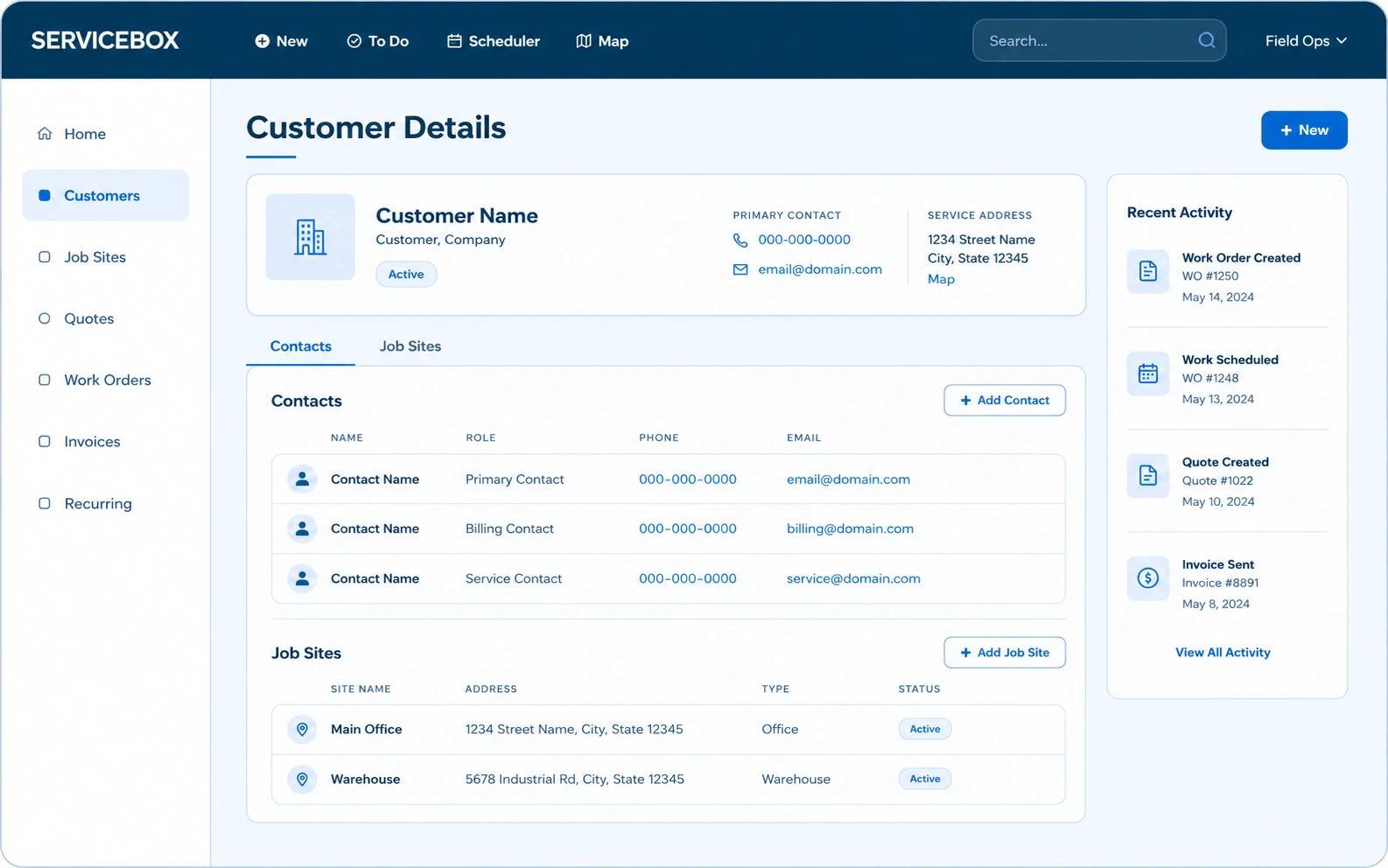
ServiceBox Field Service CRM software keeps customer details, job sites, contacts, equipment, service history, notes, invoices and agreements connected in one operational record for the office and field.
The operational outcome
Structure each commercial relationship once, then let dispatch, technicians, billing and accounting work from the same customer, job-site and equipment information.
Manage multiple buildings beneath one customer in a field service CRM designed for commercial accounts.
Keep access instructions, contacts, documents, forms and notes specific to the location where work happens.
Connect equipment, identifiers and complete service history to the correct customer and job site.
Inside Customers & job sites
Customer information becomes useful when it stays connected to scheduling, field work, recurring service, quotes, invoices and accounting. That connection reduces re-entry and keeps the full customer story available after the first visit.
Maintain the commercial billing relationship, customer details, categories, default pricing and tax context in one Field Service CRM record.
The office can identify the correct commercial account before creating work or sending documents.
Organize many serviced buildings or locations beneath one customer.
Dispatch and billing can distinguish the customer that pays from the location where work happens.
Store customer- and site-level contacts, roles, phone numbers and email destinations.
Technicians reach the right site contact while invoices and quotes go to the right commercial contact.
Track serviceable assets by job site with customizable fields, identifiers and related work history.
The next technician can see which unit is being serviced and what happened previously.
Configure customer, job-site and unit fields around the information your operation needs.
Commercial requirements such as access, contract status or equipment attributes become structured data rather than buried notes.
Review related quotes, work orders, invoices, payments, recurring work, notes and documents from the applicable customer, site or equipment record.
Office and field users can answer customer questions without searching separate folders or message threads.
Keep photos, documents, access instructions and internal notes with the customer, site or work record.
Important site knowledge survives employee turnover and repeat visits.
Configure reminders using the customer record and your chosen communication process.
The team can follow up on future service opportunities without relying on memory.
Use a portal intake form to collect new service requests into a controlled workflow.
Customers have a clearer path to request service and the office begins with more complete information.
Bring customer, job-site and unit data into ServiceBox using supported import processes.
A guided data transition preserves relationships instead of creating a flat, disconnected customer list.
How it helps the business
Field Service CRM software creates value when it shortens a handoff, protects billable information, improves communication or helps the next person make a better decision.
Find the right customer, service location, contact, equipment and history before assigning the call.
Give technicians the customer history, site instructions and equipment details the last visit already earned.
Keep bill-to customer, service location, tax, pricing and purchase-order context distinct.
Every completed visit strengthens the customer and equipment history for the next one.
One connected workflow
Each role adds the customer information it owns. The next role receives the context instead of rebuilding the record at every handoff.
Maintain the commercial account and billing relationship.
Store location-specific contacts and operating context.
Build an asset-level service history.
Attach every visit to the correct operational record.
Configuration and adoption
ServiceBox onboarding connects customer records to your categories, statuses, permissions, documents and handoffs, then tests the CRM workflow using work your team actually performs.
Decide how customers, job sites, contacts and equipment should relate before importing data.
Configure categories and custom fields around information people will actually maintain.
Resolve duplicates and incomplete addresses, contacts and unit identifiers before migration.
Teach office users how to maintain records and technicians how to find and update the context they own.
Clear expectations
A strong implementation starts by defining what each customer, job-site, equipment and location record represents, who maintains it and how exceptions should be handled.
Guided adoption
Your onboarding specialist configures ServiceBox around the way your commercial service business works, then trains office and field roles on the customer workflow each team owns.
Frequently asked questions
Understand how ServiceBox customer information software supports complex accounts, retention, implementation and operational ROI.
Traditional CRMs are usually designed around sales pipelines. ServiceBox is built for field service businesses where customer relationships include job sites, emergency calls, equipment history, warranties, service agreements and on-site work.
The Field Service CRM connects customer information with scheduling, dispatch, work orders, invoicing and mobile access. Technicians can review and update service records in the field while office teams manage the full customer relationship in the same operational system.
Complete service histories and communication records help technicians arrive prepared with the customer context, equipment information and previous work needed to deliver consistent service.
ServiceBox also supports follow-up workflows, preventative-maintenance planning and reminders. When every team member can see customer preferences and past interactions, it becomes easier to provide reliable, personalized service that earns repeat business.
Yes. ServiceBox is designed to manage the complex customer structures common in commercial field service, including multiple job sites, different contacts and billing relationships, serviceable equipment, customer categories and varied service requirements.
The customer, job-site and equipment hierarchy keeps each detail connected to the correct operational record instead of flattening everything into one contact list.
Results depend on data quality, workflow design, training and adoption, but teams can begin seeing improvements after onboarding and data imports are complete. Early gains often come from spending less time searching for customer information, reducing duplicate entry, improving scheduling decisions and moving completed work into billing faster.
Over time, organized customer history and more consistent follow-up can also support stronger retention, more recurring work and better customer experiences.
Built For Canada
ServiceBox is Built For Canada, shaped around the day-to-day realities of commercial service businesses. That means workflows built for customer sites, equipment history, recurring service, field teams, invoicing and Canadian accounting—not a generic US-first system your team has to work around.
See why ServiceBox is Built For Canada →.webp)
From commercial HVAC and plumbing to electrical and multi-trade teams, ServiceBox connects the full service workflow while supporting Canadian needs like Sage 50 Canada handoffs and human implementation support.
No generic product tour
Bring the customer structure, job sites, equipment, communication needs and exceptions your team handles today. We will show the connected workflow and identify what should be configured.