Capterra review
“I love that everything is in one location & we've gone completely paperless.”
Job software for Canadian contractors
Quote, dispatch, work order and invoice on one job record, so nobody re-keys a job and the invoice is ready the day the work closes. Books stay in Sage 50 or QuickBooks.
Our prices are public. See plans and pricing
4.3/5 across 168 Capterra reviews2026 Capterra Shortlist·Software Advice Frontrunner
Sage 50 Canada and QuickBooks · Canadian dollars · Built in Regina
Watch: why Full Throttle's techs use ServiceBox. Customer since 2016.
Sage 50 Canada and QuickBooks
Invoices hand off to Sage 50 Canada, QuickBooks Desktop or QuickBooks Online.
Canadian dollars
Priced and billed in Canadian dollars.
Built in Regina
Built and supported in Regina, Saskatchewan.
Quote to invoice
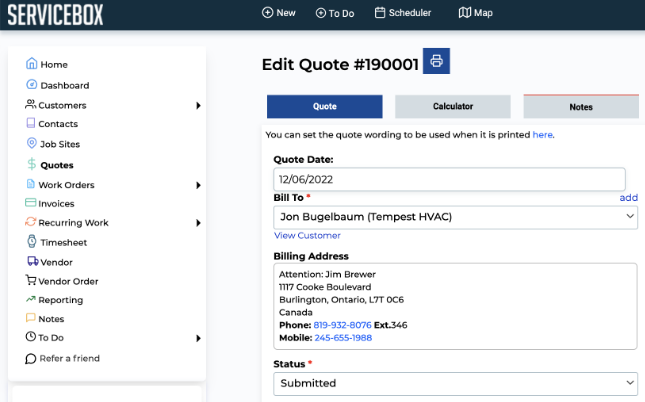
Quoting
Build the quote with labour, materials and scope, from the office or from the truck. When the customer approves, the quote becomes the work order with the scope and pricing already on it.
The problems we fix for service shops
Quotes rebuilt from scratch every time
Templates and a shared price list for the repairs, maintenance agreements, replacements and installs you quote every week.
Approved scope that never reaches the crew
The approved quote carries into the work order, so the techs see the scope the customer signed off on.
Quotes that sit in an inbox
Sent, viewed, approved and outstanding quotes are visible, so the office knows which ones need a call.
Scheduling and dispatch
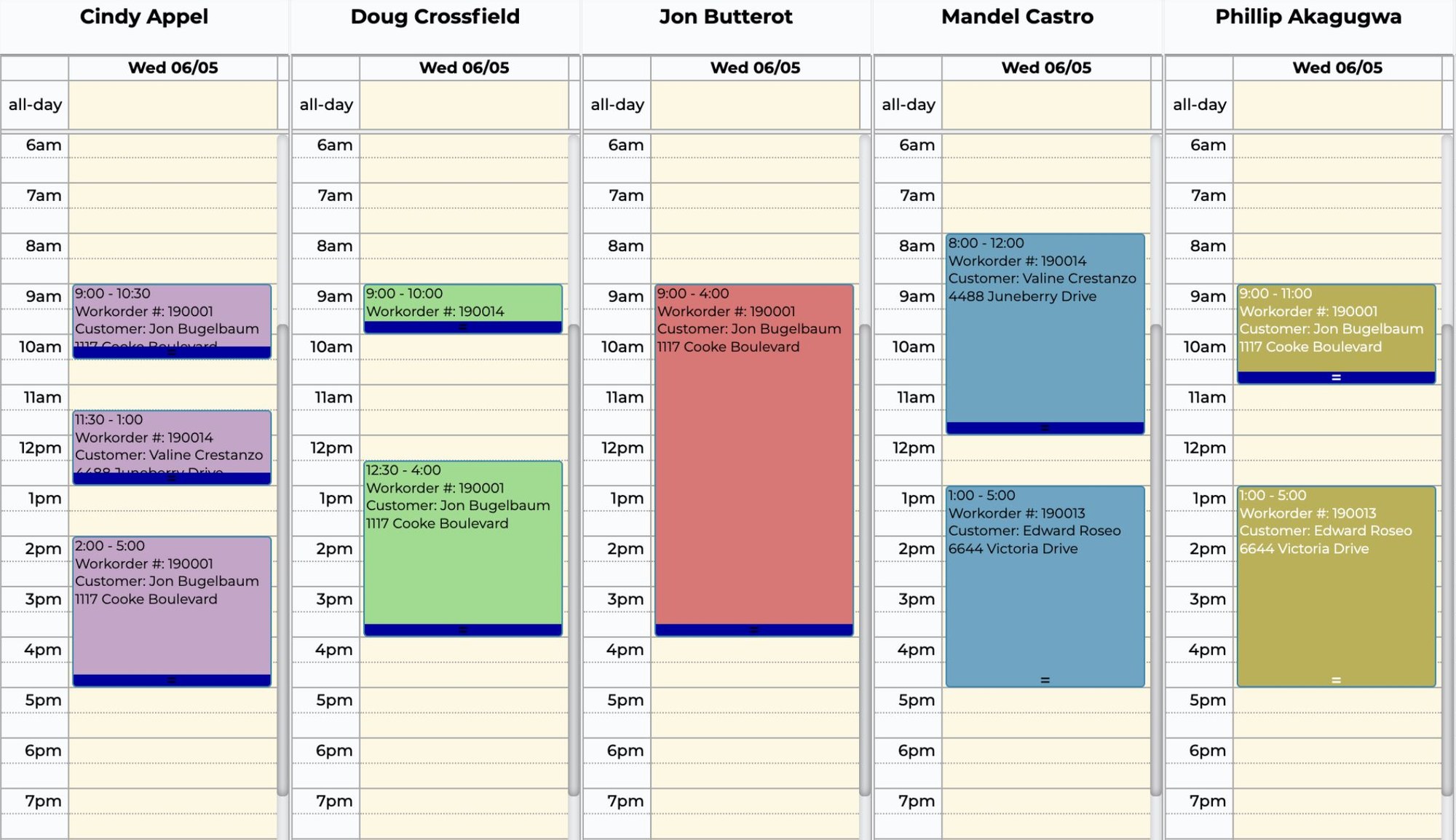
Drop the call on a tech with capacity. Customer, job-site and equipment history go with it, including what happened on previous visits, and the board moves by drag and drop.
The problems we fix for service shops
Urgent calls that cannot wait
Dispatch urgent work with the customer, site and equipment history already in hand.
Techs leaving without the job details
Drop the work order on the tech and the site contact, access notes and prior work go to the truck.
Service and maintenance on two schedules
One-time jobs, recurring maintenance and quoted work sit on the same dispatch board.
Work orders and mobile
The tech records time, materials, photos, forms and notes on the dispatched work order while on site, so the office has the information it needs without chasing paperwork.

The problems we fix for service shops
Field paperwork that comes back late
Labour, materials, forms, photos and notes are recorded on site, not at the end of the week.
Scope changes nobody wrote down
Field notes, approvals and photos are kept when the scope changes.
History that lives in one tech's head
Customer, site and equipment history stays together, ready for the next service call.
Invoicing and accounting
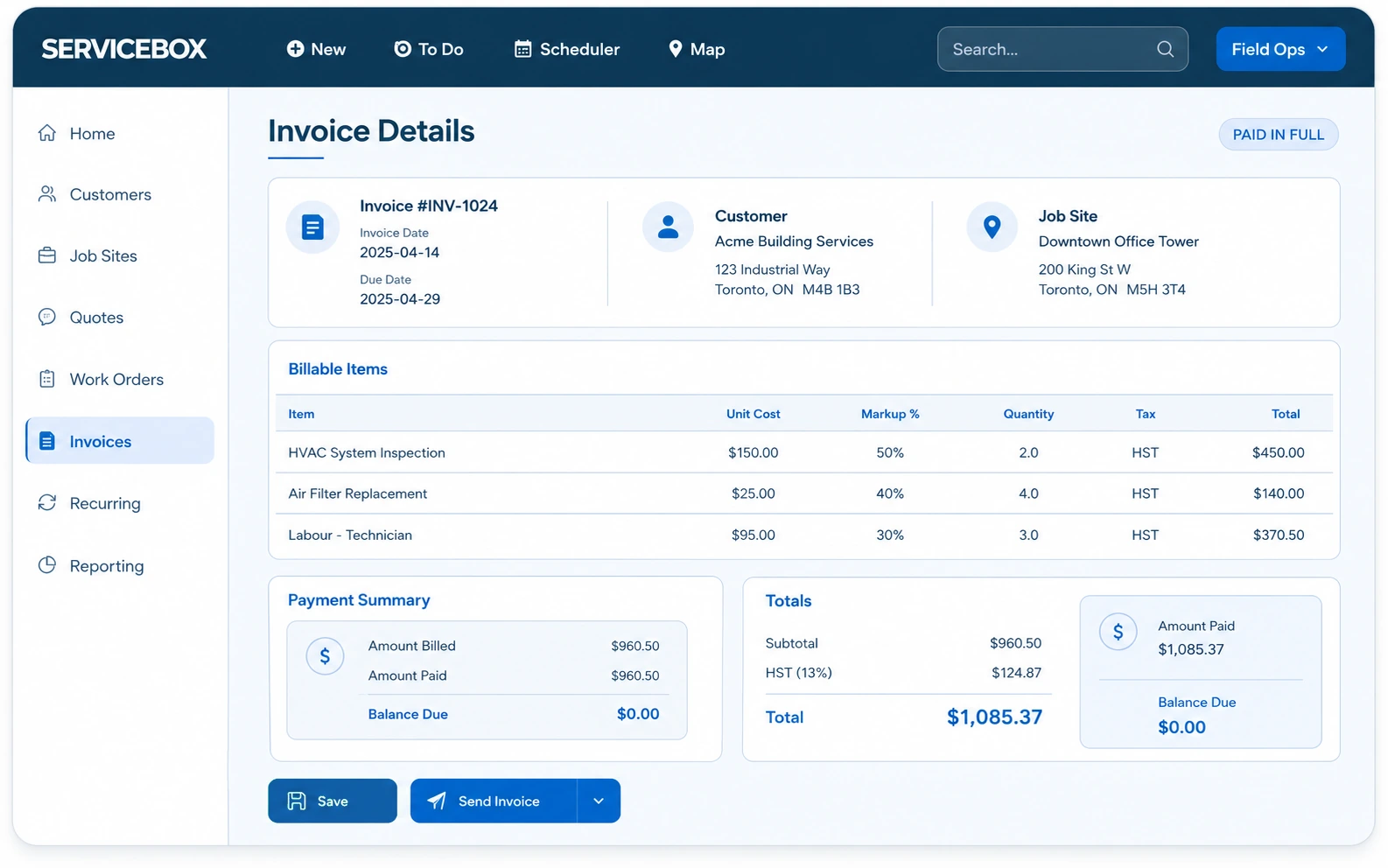
Completed work comes back from the dispatch board for one review, then the invoice, without entering the same details again. Supported records hand off to Sage 50 or QuickBooks.
The problems we fix for service shops
Invoices rebuilt from paper notes
Completed job details move into billing without re-entering the same details.
Billing that waits for the paperwork
Review the time, materials and job details already recorded, then prepare the invoice.
Books that need re-keying
Invoices hand off to Sage 50 Canada, QuickBooks Desktop or QuickBooks Online.
Reviews

Customer story · Heating
Full Throttle Furnace and Duct Cleaning connected scheduling, quoting, work orders and field communication in ServiceBox as the team grew. Customer since 2016.
“It has proven easy for our Technicians and Admin team to utilize and our Customers get a great end product too.”
Clint Orr, Full Throttle Furnace & Duct Cleaning
“I love that everything is in one location & we've gone completely paperless.”
ServiceBox is easy to use, highly configurable and supported by a friendly team that continues to check in.
Croft Electric runs its field and office teams on one system.
Scheduling, mobile work orders, time cards and billing, connected.
Capterra and Software Advice share a Gartner Digital Markets review pool, so their review counts are not combined. Summarized reviews are clearly labelled.
Accounting integration
Run your jobs and prepare invoices in ServiceBox. Supported records hand off to the accounting software you already use.


QuickBooks Online · QuickBooks Desktop · Sage 50 Canada
ServiceBox runs
Jobs, work orders, labour and materials, invoices and payment status.
Your books stay in
QuickBooks or Sage, which stays the financial system of record.
Running Sage 300 Premium, or not sure about your setup? We confirm how ServiceBox works with it on the demo.
How the handoff works
Close the job
Labour, materials, purchases, notes and changes are on the work order.
Review before billing
Billing checks the completed job, not paper, texts or spreadsheets.
Create the invoice
It stays connected to the customer and the job, with invoice and payment status tracked.
Hand off to your books
Supported records move into QuickBooks Online, QuickBooks Desktop or Sage 50 Canada after review.
Set up with you. Accounting mapping and test transactions before go-live.
Book a demoProTrades Mechanical · Windsor, Ontario
“A great bridge between the way we like to work, and how ServiceBox works.”
Jennifer MacDonald, ProTrades Mechanical
A Windsor, Ontario shop running its invoicing straight through to Sage 50.
Read the ProTrades storyThe platform
Dispatch leads the day. Add purchasing, inventory and locations as the shop grows.
Customers, sites & equipment
Full history connected and easy to find.
Scheduling & dispatch
Every tech's day on one board, with the job details before they arrive.
Work orders & mobile
Record time, materials, forms, photos and notes on site.
Recurring maintenance
Recurring work orders schedule repeat visits and keep service history with each job.
Quotes & invoicing
Move from approved quote to completed work to invoice, with less re‑entry.
Timesheets & payments
Track field time and payment activity alongside the work.
Purchasing & inventory
Tie suppliers, purchase orders and material costs to each job, and track stock across warehouses and trucks.
Multi-location operations
Manage branches, teams and schedules in one system.
Features vary by plan. The demo is tailored to your shop.
Before the demo
Yes, for quoting and invoicing. Quotes, work orders and invoices live in ServiceBox on one record per job. Your books stay in Sage 50 or QuickBooks and the invoices hand off to them.
Plumbing, heating, electrical and multi-trade shops all run on it. Every trade's work orders sit on the same drag and drop dispatch board.
Yes. Techs record time, materials, photos, forms and notes on the mobile app while on site, and saved work stays reachable when the signal is weak.
It depends on how many techs, customers and service agreements you bring over. You get help setting up, bringing over your data and training the office and the techs, and support stays with you as the team grows. The demo walks through the timeline for a shop like yours.
No. Canadian shops are priced and billed in Canadian dollars.
No. ProTrades Mechanical runs on ServiceBox from Windsor, Ontario, with the same Regina team behind it.
Book a demo
We look at how you schedule, bill and hand off to your books today, then what getting started takes. You'll see how to:
Or see plans and pricing first.