

2027 update | For Canadian commercial and residential electrical contractors
Video: How mobile access helps a small service team
Watch the ServiceBox mobile field service customer story
An electrician's phone can do more than make calls. The right apps can help check a cable run, view plans, find a past job, record work, and send the details to the office. That matters when your crew is at a busy plant, a retail site, or a home across town.
The best apps for electricians in Canada cover two jobs. Some help you do electrical work in the field. Others help you run an electrical contracting business. You may need both, but you do not need 20 paid apps.
Quick answer: For a service company, start with a mobile work order and dispatch app such as ServiceBox. For commercial plans, look at Fieldwire or Bluebeam. For job photos, try CompanyCam. For field math, try Southwire's calculators or QuickBend. For your books, look at QuickBooks Online. Check Canadian code rules before you use a calculator or a US code reference on a live job.
For crews that handle service work across homes, warehouses and offices, see how electrical contractor software for Canadian service businesses can link field work orders, scheduling and billing.
Why do electrical contractors need mobile apps?
A small electrical shop may have a service crew, an install crew, and an office worker all working on the same day. One person needs a panel photo. Another needs the latest drawing. The office needs labour hours and material used before it can send a bill.
Good electrician apps can help your team:
- Find the job: See the site address, contact, scope, and past work.
- Do the work: Check drawings, measurements, and trade references.
- Keep a record: Add photos, site notes, test readings, and signatures.
- Stay on schedule: Send job changes to the right crew.
- Get paid: Turn a complete work order into an invoice without typing the same details again.
For a commercial electrical firm, the gain is often better handoffs between the field, office, and site lead. For residential electricians, it may be quicker quotes, fewer missed details, and faster billing.
Best electrician apps at a glance
| Need | Apps to look at | Best fit |
|---|---|---|
| Work orders, scheduling, invoices | ServiceBox | Electrical service companies with field crews |
| Accounting | QuickBooks Online | Office staff and owners |
| Messages and shared files | Microsoft Teams, Google Drive | All teams |
| Job photos and paper forms | CompanyCam, Adobe Scan | Service and install crews |
| Drawings and commercial sites | Fieldwire, Bluebeam, Autodesk Forma, Raken | Commercial electrical projects |
| Electrical calculations | Southwire tools, QuickBend, Electrical Calc Elite | Field electricians and apprentices |
| Test readings and measurements | Fluke Connect, Bosch MeasureOn | Techs with compatible meters or laser tools |
| Learning and troubleshooting | IDEAL Electrician's Sidekick, EveryCircuit | Techs and apprentices |
| Driving to jobs | Google Maps | Mobile service crews |
These are different types of tools, not 20 apps you should buy together. Features, mobile support, and prices can change. Check the Canadian version and the current app store listing before you sign up.
Best apps for running an electrical contracting business
For more on keeping site records with the office, see our guide to electrical work order software.
1. ServiceBox: Mobile work orders and electrical job management

Best for: Canadian electrical contractors that need one flow from dispatch to billing.
ServiceBox helps the office send jobs and lets electricians open work orders on a phone or tablet. A tech can view job and site details, add labour and materials, save notes and photos, and complete forms or signatures where set up. Office staff can use those records to review the work and prepare an invoice.
This can help with both quick home service calls and larger commercial jobs with more than one visit. It is built around Canadian service work and supports configured accounting handoffs, including QuickBooks Online and Sage 50 Canada. Confirm the data that syncs and any plan limits during a demo.
See electrical contractor software or explore the mobile field service app.
2. QuickBooks Online: Business accounting

Best for: Owners and bookkeepers who need to track income, expenses, and invoices.
QuickBooks Online helps the office manage the books and works well as one of the main accounting tools or business software options for tracking income, expenses, and invoicing. It covers the business side of bookkeeping, but not dispatch or field workflows. It is not a full electrical dispatch or field calculation app. If you also use job management software, check how invoices, customers, and payments sync between the two systems to reduce duplicate entry and support cleaner handoffs into accounting tools before you buy.
3. Microsoft Teams: Crew and office messages

Best for: Shops that need calls, chats, and file sharing in one place.
Use a Teams channel for a large site, a project, or a service group. A lead can share a site update without sending the same text to five people. Keep final job notes and safety records in your work order system, not only in chat.
4. Google Drive: Access to job files

Best for: Storing shared drawings, manuals, permits, and photos.
Drive helps people open the right file from different devices. Set clear folder names and access rules. On larger sites, use a system that tracks drawing versions and approvals, so a crew does not build from an old PDF.
5. CompanyCam: Job-site photo records

Best for: Before-and-after photos, hidden work, and progress updates.
Photos can show the state of a panel before a change, a cable route before a wall is closed, or the work at handover. CompanyCam keeps job photos together and makes them easier to share. Ask who can see the photos and whether your job system can store or link to them.
6. Adobe Scan: Paper to PDF

Best for: Turning a signed form, receipt, or paper sketch into a PDF.
A scanner app can help when a customer still gives you paper. Use it for a quick copy, then save the file to the right job. If your work order app already has forms and signatures, do not add an extra scanning step unless it is needed.
Best mobile apps for commercial electrical projects
A busy team also needs good communication between electricians and other trades on commercial job sites.
7. Fieldwire: Site plans, tasks, and punch lists

Best for: Commercial crews working from drawings.
A site lead can open plans, mark a location, add a task, and attach a photo. This is useful for lighting work, panel rooms, and items found during a walkthrough. Fieldwire works best when the general contractor and the electrical team agree on which drawings and tasks are current.
8. Bluebeam on mobile: Drawing markups and team review

Best for: Crews that already use Bluebeam for PDF drawings.
Bluebeam lets people view project drawings and add supported markups from a mobile device. It can help when the field finds a change that the office or project manager must review. Mobile tools differ by platform and subscription. Test the exact features your team uses before you roll it out.
9. Autodesk Forma: Construction project documents

Best for: Larger commercial jobs using Autodesk project tools.
Autodesk's construction cloud tools, including the Forma family, can give site teams access to project files, sheets, issues, and other field records, based on their plan and access rights. It may make sense when the builder already uses this platform. A small service shop may not need it.
10. Raken: Daily reports and site progress

Best for: Commercial electrical foremen who must log daily work.
A foreman can record what the crew did, site conditions, and progress for the day's report. This is useful on multi-day jobs where the general contractor asks for daily updates. Check whether your job management tool already covers the records you need.
Best electrical calculator and measurement apps
11. Southwire Voltage Drop Calculator: Check long cable runs

Best for: A quick first check on voltage drop.
Long wire runs may need a closer look. A voltage drop tool can help with voltage drop calculations and wire sizing for long runs by comparing inputs such as load, wire size, and distance before you finalize a design. It calculates voltage drop quickly in the field, but the result still needs to be checked against the applicable code and design. Always confirm the result using the code and standards that apply where you work.
12. Southwire CableTech Tools: Conduit and cable planning

Best for: Cable pulls, conduit fill, and related field math.
CableTech Tools covers several wire and cable calculations in one place, including conduit sizing and box fill alongside conduit fill and cable calculations. This can help with planning a conduit run or pull on a commercial site. Tools like this are useful for code math in the field when planning runs and pulls. Enter the right cable data, then check the result with the approved plans and Canadian code rules.
13. Southwire Partial Reel Calculator: Estimate wire left on a reel
Best for: Shops that use part reels of cable.
Instead of guessing how much wire is left, a tech can use the reel details to make an estimate. This can help a foreman plan materials before the next phase of a job. An estimate is not a measured count, so leave room for error.
14. QuickBend: Conduit bending layouts
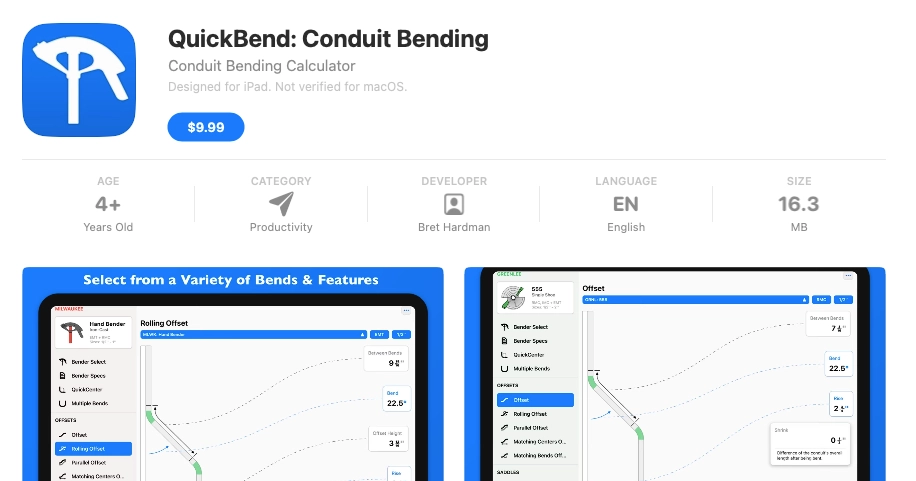
Best for: Electricians doing offsets, saddles, and other bends.
QuickBend helps with bend layout math. It can be handy when a job has many conduit runs and little room for waste. Always check the bender, conduit size, and the real site before making the bend.
15. Electrical Calc Elite: Electrical math reference

Best for: Techs who want electrical formulas and calculators in one app.
This app can help with complex electrical calculations and code calculations, not just common electrical math. Electrical Calc Elite was listed at $24.99 CAD in the Canadian Apple App Store when checked in November 2026. Its 10 selectable NEC editions are US references, not a Canadian code approval. Much of its code-based content is US-focused. A calculation tool is not proof that the design meets the Canadian Electrical Code or local amendments, and the app covers NEC editions from 1999 through 2026, which are US code editions and cannot replace the Canadian Electrical Code.
16. IDEAL Electrician's Sidekick: Trade reference tools

Best for: Quick charts and everyday reference checks.
IDEAL offers an electrician-focused app with handy field reference tools. Mike Holt's Electrical Toolbox is another free NEC calculator app electricians may compare with Sidekick for field reference use. Check the units, wire colour guides, and code source before using any result on a Canadian job. A good reference app can give quick access to reference tables, Ohm's law, wiring diagrams, and other common field references, but it is not a replacement for the code book. US reference charts may not match local requirements.
17. Fluke Connect: Save meter readings

Best for: Electrical service techs using compatible Fluke test tools.
With supported wireless meters, Fluke Connect helps capture and review readings. A saved reading can make a service report clearer, especially when a fault needs follow-up. Check that your exact meter works with the app. A phone does not replace safe test methods or the meter itself.
18. Bosch MeasureOn: Site measurements and notes

Best for: Measuring rooms and layouts with compatible Bosch laser tools.
MeasureOn helps keep measurements, simple sketches, photos, and notes together. For a lighting retrofit, that can make it easier to share dimensions with the person doing the quote. Check which Bluetooth measuring tools are supported.
19. EveryCircuit: Learn how a circuit works

Best for: Apprentices and techs who want to see how circuits act.
EveryCircuit lets you build and test sample circuits on a screen. It is a learning tool, not a test of a live installation. Use approved test gear and safe work methods on the actual site.
20. Google Maps: Find the next job

Best for: Residential and commercial service crews travelling between sites.
A good route matters when one tech has three calls in a day. Maps helps drivers get to a job and see traffic. For several technicians, the dispatcher still needs a shared schedule and up-to-date job status. Directions alone cannot manage a work order.
Canadian electrical code: What apps cannot replace
The Canadian Electrical Code (CEC) matters on both residential and commercial work. But the code in force can differ by province or territory, and local rules may add changes. For example, British Columbia and Ontario adopted 2024-based electrical codes in 2025, with their own rules and processes.
Use the current code through CSA Group and check the electrical safety authority in your province. Apps built around the US National Electrical Code (NEC), including some US calculator and reference apps, must not be treated as Canadian code approval. Most electricians still need an authoritative code source and should not treat an app as approval from the AHJ. A phone level, simulator, or voltage-drop estimate cannot replace proper electrical test tools, an approved design, or the required inspections. NFPA LiNK is another digital option for US code access, but it is not Canadian approval.
Which apps are best for residential vs. commercial electricians?
For a residential service company
Start with the right electrician app for your business model, especially if you handle residential service work. A tech needs to know the address, the work to do, and what parts were used. A simple mix may be ServiceBox for jobs, QuickBooks Online for books, and one trade calculator. Many small shops prefer one platform for scheduling and work orders, with specialist trade calculators kept separate.
For a commercial electrical company
Start with site records, crew assignments, materials, daily notes, and approved drawings, especially if commercial contractors need software that can handle project management from start to completion, not just dispatch. A good mix may be ServiceBox for service and job records, Fieldwire or Bluebeam for drawings, and Fluke Connect for readings if the team uses matching tools. On larger commercial work, structured cost-tracking systems and job costing usually matter more than they do for smaller service calls. Add a larger all in one platform only if the contract or general contractor needs it. For electrical teams comparing tools by size, examine crew scheduling, job costing and support needs before deciding between simple and large systems.
For a company that does both
Keep one main customer and work order record. Most electricians end up using one system for core jobs, plus separate calculator apps or a reference app for technical work. Use job types or checklists for a home call, a generator inspection, and a multi-day panel change. One platform can reduce duplicate entry, but it usually will not replace every specialized app, so avoid making techs copy the same hours, photos, and materials into three apps.
Example: How a mobile app helps on a commercial electrical service call
For labour hours and job costing, learn how electrician time tracking software helps link crew time to each job.
Picture a warehouse with a panel fault. The office gets a call while the crew is already busy. Here is a simple app-based workflow:
- Dispatch: The office creates a work order with the site contact, issue, address, and past service notes.
- Arrive: The electrician reads the work order on a phone and checks site access and safety steps.
- Diagnose: The electrician uses approved test equipment. A compatible meter app may save readings. Any app math is checked against the right code and job rules.
- Document: The electrician adds photos, findings, time, and materials to the work order. If the job needs a repair quote, the office can use the notes to prepare it.
- Close the loop: The office reviews the complete record and prepares the invoice. A repeat issue is easier to track because the site history is still there.
In a ServiceBox customer video, a small business owner describes dispatching staff remotely and entering job materials while on site so billing details are not lost. That is one customer's experience, not a promise that every team will get the same result.
How to choose apps for your electrical business
If you also handle maintenance visits, read about recurring work orders for electrical contractors.
Before you pay for another tool, choose electrical contractor apps based on your daily operations and the type of work your business handles. Electrician apps cost anywhere from free tools to monthly business software, so compare any free tier, paid tiers, and free trial before you buy. Then test the app on a real job.
- Job type: Does it fit service calls, project work, or both?
- Devices: Will it work on the phones, tablets, and browsers your team uses across iOS, Android, and web access?
- Offline use: Can your tech open saved job data with weak signal? What updates wait to sync? Test whether electrician apps work offline in airplane mode before you rely on them.
- Canadian needs: Does it handle Canadian tax and accounting workflows where needed? Does its code content match your province?
- Handoffs: Can the office use the field notes and material list without retyping them?
- Access: Can you control who sees customer, site, and financial data?
- Cost: Is the price a one-time calculator purchase or subscription business software? Is it per user, per month, or per project? What do you already pay for, and is there public pricing?
A simple test is to give two electricians the same sample work order and ask them to open it, add photos and hours, and mark it complete. If they need a long training session for those basic steps, keep looking.
How can electrical contractors manage dispatch, quotes and job costing?
For a Canadian electrical contracting company, start with one main system that connects the work. An electrician should be able to open a work order, see the site details, record labour and materials, add notes, and send the completed information back to the office. A connected process also helps the team keep track of job costs before the invoice goes out.
Scheduling and work orders for residential and commercial crews
ServiceBox supports dispatcher-controlled scheduling and field work orders for electrical service teams. Office staff can assign work and keep customer and job-site notes in one place. Electricians can check the job details from a phone or tablet, record the work completed, and pass the details back for review. For a small residential job, that can mean fewer lost notes. For commercial service, it helps teams follow up on a site over many visits.
Quotes, materials and invoicing in one workflow
For a repair quote, capture the job scope, labour and materials first. The office can then prepare the quote, review approved work, and use the work order details to prepare an invoice. Job costing needs real field records, not guesses. Ask which price book, taxes, approvals and accounting handoffs are available for your plan and setup.
Keep separate apps for tasks such as circuit calculations, meter readings and drawing markups. They help an electrician do technical work but should not replace the main customer and job record.
How much do electrical calculator and reference apps cost in Canada?
A specialized electrical field app may have a one-time purchase price or free online tools. Prices can change by device and country. The examples below are Canadian listings checked in November 2026, not prices for a full electrical business management system.
| Tool | Listed price | Useful for |
|---|---|---|
| QuickBend | $9.99 CAD, iOS | Conduit bending layouts |
| Ugly's Electrical References | $17.99 CAD, iOS | US NEC reference tables and formulas |
| Electrical Calc Elite | $24.99 CAD, iOS | Electrical calculations based on US NEC data |
| Southwire calculators | Free online tools | Voltage drop and wire or cable planning checks |
Sources: QuickBend on the Canadian App Store, Ugly's Electrical References on the Canadian App Store, Electrical Calc Elite on the Canadian App Store, and Southwire's calculator tools.
Check current pricing and platform support before buying. US code calculators are not a substitute for the Canadian Electrical Code or provincial rules.
Which electrician apps work offline?
A job site may have poor signal. Ugly's Electrical References lists offline use, and Electrical Calc Elite also says its calculators work offline. Work offline is not the same as syncing job data. Before buying a field service app, test it in airplane mode on the phones your crew uses. Confirm which drawings, job notes, photos and forms remain available and what happens when a device reconnects.
Ugly's 2026 edition is a US NEC reference app. Its charts cover motor data, NEMA configurations, Ohm's law, voltage drop, conduit fill and wiring diagrams. It can help with learning or math, but it must not replace a current Canadian code book. NFPA LiNK also offers access to more than 1,600 US NFPA codes and standards. Neither is the source of approval for a Canadian installation.
Which electrical code references can be used on a Canadian job?
US field apps such as Ugly's and NFPA LiNK offer helpful reference tables, motor data and wiring diagrams. In the US, Ugly's app uses the 2026 NEC, and NFPA LiNK covers more than 1,600 NFPA standards. A Canadian electrician should use the current Canadian Electrical Code and the version adopted in their province or territory for code decisions. A field calculator can speed up the math, but it cannot replace a licensed professional's checks, proper test equipment or inspections.
How should Canadian electricians manage estimates and quotes?
For a residential service call, start by recording the customer's problem and work scope. Add labour, parts and any other charges. Check the quote carefully before sending it. For a larger commercial job, use the approved drawings, takeoffs and site notes to check quantities, labour and materials before putting a price together.
With ServiceBox, the office can prepare quotes and connect approved work to work orders, then use the recorded job details to prepare invoices. This keeps the electrical business focused on a clear handoff from field work to billing. Confirm the quote and accounting steps for your chosen plan.
Frequently asked questions about electrician apps
What are the best apps for electricians in Canada in 2027?
There is no single best app for every electrical shop. The right choice depends on whether you need business software, calculator apps, or a reference app.
For many electrical service firms, the best starting set is a work order app, an accounting app, and one trade calculator. ServiceBox, QuickBooks Online, and Southwire tools cover different parts of that work. Commercial crews may also need Fieldwire or Bluebeam for plans.
Is there a free electrician app?
Yes. Southwire provides free calculator tools for common electrical checks. Some other apps have a free trial or a free tier, but check the limits. For paid apps, compare the total cost for your crew, not just the price for one user. Check iOS, Android and Google Play support before you buy.
What app helps an electrician calculate voltage drop?
Southwire has electrical calculation tools that include voltage drop. Enter the right load, conductor, length, and other details, then verify the result against the code, design, and job conditions.
What app is best for commercial electrical contractors?
The answer depends on the job. A service contractor often needs scheduling, work orders, labour, materials, and invoices. A construction subcontractor may also need drawing review, punch lists, and daily reports. No single app in this list is the best at every task.
Can electrician apps help a residential and commercial company?
Yes. A shared job management app can help keep customer, site, work order, billing, and customer management details together, while making scheduling easier across multiple crews when needed. An all-in-one platform can help, but many companies still keep separate technical apps for field calculations and code reference. Use extra drawing, measurement, or reporting apps only for the crews that need them.
Do US electrical code apps work in Canada?
They can help with general math or learning, but US NEC tables and rules are not a substitute for the Canadian Electrical Code and the rules in your province or territory, and you should make sure the app’s NEC edition matches local requirements before relying on any code calculations. Always check a local, current source. Ugly's Electrical References can still be useful for quick lookups, but it does not replace the adopted code source.
Keep your crew's apps simple
You do not need a new app for every problem. Pick a main system for jobs and keep special tools for the work your electricians actually do. The goal is simple: less time hunting for details, fewer missed notes, and a clean handoff from the field to the office.
If you run an electrical service business in Canada, see how ServiceBox supports commercial electrical contractors and book a demo to walk through your own dispatch, work order, and billing process.