Electrical Invoice App & Invoicing Software for Contractors
The service call is finished, but the invoice is still waiting on a time card, material list, field note, purchase detail, or someone in the office to piece the job back together. That is the billing problem electrical invoicing software should solve.
For a commercial electrical contractor, invoicing starts with the job record—not with a blank invoice. The customer, site, work order, technician time, materials, notes, photos, approvals, and billing details all need to stay connected from the field to the office.
ServiceBox keeps that record together so the office can review completed electrical work, prepare the invoice, track billing status, and move supported information into QuickBooks or Sage without rebuilding the job from paper, texts, or separate spreadsheets.
Best fit: electrical contractors with multiple technicians, commercial job sites, recurring service work, time-and-material jobs, or multiple customer locations that need the field and office working from the same record.
Book an electrical invoicing demo or see the complete electrical contractor software workflow.
Electrical contractor proof: Croft Electric uses ServiceBox in the field to keep scheduling, work orders, time cards, job information, and billing connected. See the Croft Electric customer story.
Electrical Invoice App vs. Connected Field Service Invoicing
The right tool depends on how much of the electrical job needs to stay connected to billing.
- Simple invoice creation: a standalone invoicing app may be enough for a solo electrician who mainly needs to create and send invoices.
- Multiple technicians and job sites: look for work orders, field records, labour and materials connected to invoicing.
- Time-and-material billing: look for technician time and material capture tied to the actual job.
- QuickBooks or Sage: confirm the field-service system supports the accounting workflow your business uses.
- Commercial service history: look for customer, site and job history that stays connected to billing.
ServiceBox is designed for electrical contractors that need invoicing connected to the work their field team performs, rather than a standalone invoice generator.
What Electrical Contractors Actually Need From an Invoice App
An electrical invoice app is useful when it does more than generate a professional-looking invoice. The real value is reducing the handoff between the electrician who completed the work and the person responsible for billing it.
For a service contractor, the office should be able to open the completed job and answer the billing questions without chasing the technician:
- Which customer and site was serviced?
- What work was approved and what was actually completed?
- How much technician time should be billed?
- Which parts and materials were used?
- Were there purchase costs, photos, notes, forms, or customer sign-off?
- Is this time-and-material work, quoted work, recurring service, or a project phase?
- What needs to move into QuickBooks or Sage?
That is the difference between a simple invoice generator and electrical invoicing software connected to field service operations.
Why Electrical Contractors Need More Than Generic Invoicing Software
Generic invoicing platforms are useful when the main requirement is creating a professional invoice and recording a payment. Electrical contractors usually need more operational context.
A commercial electrical service company may need to know:
- which customer and job site the work belongs to;
- what service call or work order triggered the invoice;
- which technicians worked on the job;
- how much labour was recorded;
- which materials were used;
- what notes, photos, or sign-off were captured;
- whether the work came from a quote, recurring service, or reactive call;
- whether billing information needs to move into accounting software.
Electrical contractor software brings those records together. Instead of treating invoice creation as a separate administrative task, the billing process becomes the final stage of the same job workflow.
For a growing electrical business, a shorter billing handoff can help cash flow by reducing the delay between completed work and invoice preparation. The goal is not to promise faster payment; it is to give the office a cleaner record to review, send invoices sooner when work is ready, and keep payment status visible.
How an Electrical Service Call Becomes an Invoice
A practical billing workflow should feel familiar to an electrical service business:
1. Open the right customer and job site
For commercial contractors, one customer may have several buildings, contacts, panels, equipment records, and service histories. Start the work on the correct site record so billing does not have to sort it out later.
2. Create the quote, service call, or work order
Some jobs start with an approved quote. Others begin as a reactive call or scheduled maintenance. In each case, the scope and site context should carry forward instead of being re-entered at every step.
3. Capture technician time, materials, and field details
Technicians record what billing will eventually need: labour, materials, notes, photos, forms, and sign-off. For time-and-material work, those field records are especially important because the invoice needs to reflect what actually happened on site.
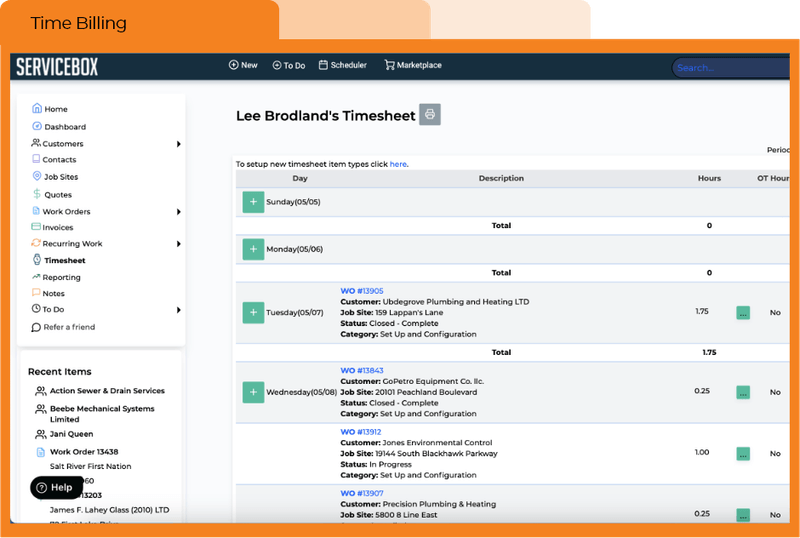
4. Review the completed work before billing
The office reviews the completed work order while the job details are still attached to it. Missing time, material, purchase, or approval information can be corrected before the invoice goes out.
5. Prepare the invoice from the completed record
Billing can create the invoice with the customer, job site, work details, charges, notes, and billing status already connected to the service record.
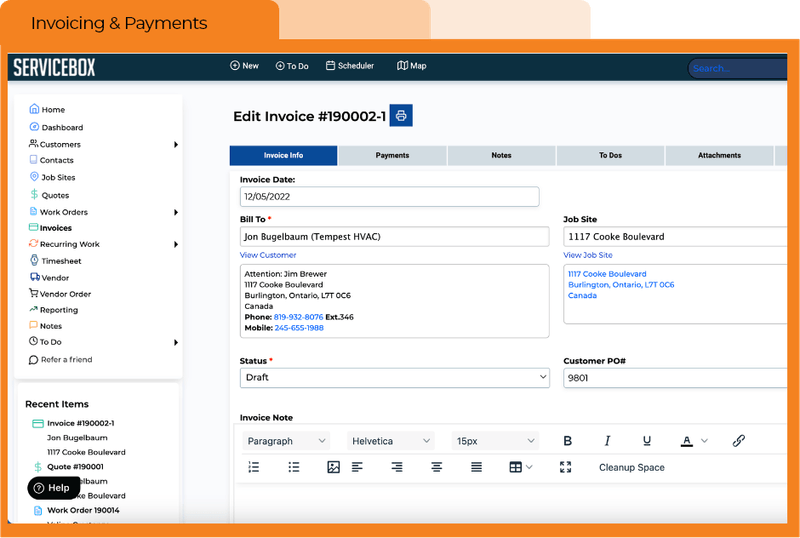
6. Track what has been billed and paid
Once the invoice is sent, the office still needs visibility into billing and payment status without losing the connection to the customer and job.
7. Hand the financial record to accounting
ServiceBox is the operational system; QuickBooks or Sage can remain the financial system of record. Supported invoice, payment, customer, and related information can move through the configured accounting workflow after review.
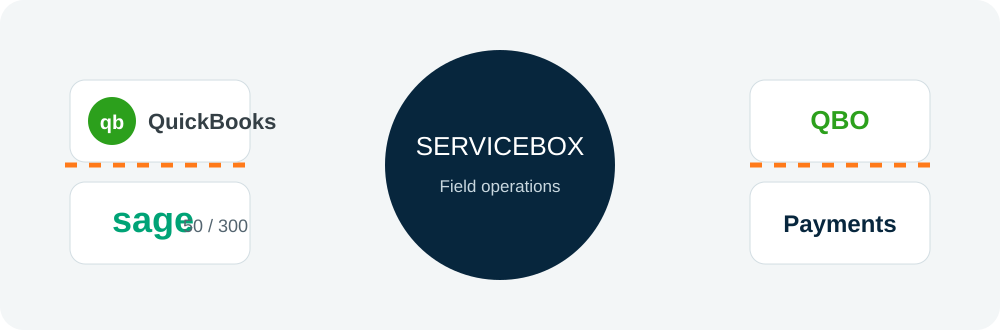
Explore ServiceBox accounting integrations.
Mobile Invoicing Starts With Better Field Records
The goal is not to make an electrician rebuild an invoice from memory on a phone. The goal is to capture the information billing needs while the technician is already doing the work.
From a supported mobile device, technicians can work from the correct customer and site record, update the work order, record labour and materials, add notes and photos, complete forms, and capture sign-off. The office can then review that same completed record instead of chasing paperwork at the end of the day.
This is particularly useful for commercial service teams where the technician, dispatcher, project manager, and billing person may all be different people.

See how Croft Electric uses ServiceBox in the field.
Key Features to Look for in Electrician Invoice Software
The right invoicing software should make the billing process more accurate without forcing the electrical business to manage a second version of the job.
Job-connected invoice creation
Look for an invoicing workflow tied to work orders, customers, and job sites. The invoice should have operational context rather than existing as a standalone document.
Time tracking tied to electrical jobs
Timekeeping is more useful when recorded labour is attached to the correct work order. This makes it easier to review technician hours before billing and supports more accurate time-and-material invoicing.
Material capture
Electrical jobs often involve parts and materials that need to be reflected in job costs and customer billing. Capturing those items in the field record reduces manual calculations later.
Mobile access
Technicians should be able to access their work and update job details from a supported mobile device. Better field records create better invoices.
Customer and job history
Past invoices are only one part of the picture. The office should also be able to see previous service work, job-site information, notes, and the customer relationship behind the current invoice.
Professional invoices and billing status
Electrical invoice software should make it straightforward to create professional invoices and keep invoice status visible as work moves through the billing process.
Online payment options
When online payments are enabled, giving customers a direct way to pay can reduce friction between sending an invoice and receiving payment. See the current ServiceBox Payments page for available payment features and pricing.
Accounting software integration
If the business uses QuickBooks or Sage, invoicing software should support a clean operational-to-accounting workflow. This reduces duplicate data entry and keeps the field service system focused on job execution while the accounting platform remains the financial system of record.
Electrical Invoicing Software vs. Standalone Invoice Generator
A standalone invoice generator can be enough for a sole operator who mainly needs to create and send a bill. A growing electrical service company usually has a different problem: the information required to bill is spread across the customer record, job site, work order, technician time, materials, purchases, notes, and accounting system.
Connected electrical invoicing software keeps that chain together:
customer → job site → quote or service request → work order → technician time and materials → completed work → invoice → accounting.
If the office still has to reconstruct the job before it can invoice, the invoicing tool is only solving the last step.
Example: Invoicing a Commercial Electrical Service Call
Imagine a property manager reports an electrical issue at one of several commercial buildings.
The office opens the correct customer and job site, creates the work order, and schedules the service call. The technician receives the job details in the field and completes the repair.
During the visit, the technician records labour, materials used, notes, photos, and any required sign-off. The office reviews the completed work order before billing.
Instead of asking the technician for a separate paper timesheet or trying to reconstruct material usage later, the billing team can work from the completed service record.
The invoice is then prepared for the correct customer and location, billing status remains visible, and supported financial information can move into the accounting workflow.
For commercial electrical contractors, that continuity is far more important than simply having an app that can generate an invoice template.
How Electrical Invoicing Connects to the Rest of ServiceBox
Electrical invoicing works best when it is connected to the rest of the service operation without trying to turn one page into a description of every feature.
Electrical contractor software. Scheduling, customer/site history, work orders, field documentation and recurring service all feed the operational record that eventually reaches billing. Explore ServiceBox electrical software.
Quotes and invoicing. Quotes, completed work and invoices can stay part of one connected service workflow. See quoting and invoicing software.
Job management. Work orders carry job details, progress and completion information before billing. See job management software.
Mobile field service. Technicians can capture the labour, materials, notes, photos and forms billing staff need. See the mobile field service app.
Payments. Payment functionality can connect the customer payment step to the invoicing workflow. Explore ServiceBox Payments.
Accounting. Supported QuickBooks and Sage integrations connect field-service billing with the financial system. Explore accounting integrations.
Electrical Invoice App FAQs
What is the best electrical invoicing app for electricians?
The best option depends on the type of electrical business. A contractor that only needs basic invoice creation may be fine with a standalone invoicing app. A commercial service contractor should also consider work orders, customer and job-site history, technician time, materials, mobile field records, payment workflow, and accounting integration.
Can an electrician create an invoice from a completed work order?
With connected electrical contractor software, the completed work order can provide the information used to prepare the invoice. In ServiceBox, labour, materials, notes, and other field details can remain associated with the job as the office moves the work into billing.
Can electricians invoice from the job site?
Technicians can capture the field information needed for billing from supported mobile devices. Depending on the company's process, the office can then review the job and prepare the invoice, or the business can configure a workflow that gives field staff more responsibility for completing the billing record.
Does electrician invoice software track time?
ServiceBox includes time tracking connected to work orders. That helps electrical contractors review recorded labour against the job before invoicing.
Can electrical invoicing software track materials?
Materials used on a job can be captured as part of the work record. This helps billing and job-cost review stay connected to the actual electrical work completed.
Does ServiceBox integrate with QuickBooks?
ServiceBox supports integrations with QuickBooks Online and QuickBooks Desktop, along with supported Sage products. The exact workflow depends on the accounting platform and configuration.
Can customers pay electrical invoices online?
ServiceBox offers payment functionality that can support online payment workflows. See the current ServiceBox Payments page for available payment features and pricing.
How much does electrical invoice software cost?
Pricing varies by plan and number of users. ServiceBox pricing is packaged by plan and team size. For current pricing, use the ServiceBox pricing page rather than old per-user prices published in historical articles.
Turn Completed Electrical Work Into a Clean Billing Record
When the electrician marks the job complete, billing should already have the customer, site, work performed, technician time, materials, notes, and approvals needed to review the invoice.
That is the workflow ServiceBox is built to support: keep the field record connected through billing, payment status, and the supported accounting handoff instead of asking the office to reconstruct the job after the fact.
If your electrical business handles commercial service calls, multiple technicians, multiple customer locations, recurring maintenance, or time-and-material work, bring one real job to a ServiceBox demo. We can walk through how that job moves from service request to completed work and invoice.

![How to Schedule Visits for HVAC Systems [Seasonal Maintenance Guide]](https://cdn.prod.website-files.com/67ae6e3fa71598c124af0f8b/6ab5b39ad7006a6e8dd23304_Dispatch%20team.jpg)