

Watch: How to Handle Same-Day HVAC or Electrical Schedule Changes Without the Chaos
Watch the ServiceBox same-day dispatch video
A good workday starts with a schedule your team can actually follow. Your technicians know where they are going, customers know when to expect service, and your office can handle a surprise call without rebuilding the whole day.
But that is easier said than done when you run a busy HVAC, electrical, or plumbing company. One emergency repair, missing part, or job that runs long can push several appointments behind. Before you know it, the dispatcher is calling around, technicians are driving across town, and customers are wondering when help will arrive.
Better field service technician and job scheduling means matching the right person to the right work, allowing realistic time for the job, and keeping everyone informed when plans change. For Canadian commercial contractors with 5 to 50 employees, it is one of the most practical ways to improve employee experience and customer satisfaction without asking people to work harder.
For trade-specific workflows, explore field service software for commercial HVAC, plumbing and electrical contractors in Canada.
What Is Field Service Technician and Job Scheduling?
If your team is also reviewing the full job process, see our field service management software guide for Canadian contractors.
Field service technician and job scheduling is the process of planning service appointments and assigning them to field technicians based on their skills, availability, location, job priority, and customer commitments. It covers the full day, not just the appointment time shown on a calendar.
Good scheduling accounts for travel, site access, required parts, job history, and the time it takes to finish the work properly. It also gives the office a clear way to handle emergency calls, cancellations, and work that needs another visit.
A dispatcher should be able to answer a few questions before assigning a job:
Who is qualified? Does the work require an HVAC specialist, licensed electrician, plumber, or a two-person crew?
Who has capacity? Is there enough time for the job, travel, breaks, and paperwork?
What does the customer need? Is the issue urgent, or is there an agreed service window?
What is ready? Are the right parts, tools, access instructions, and customer details available?
What happens next? Can the technician see the work order, report progress, and flag a return visit?
When these answers live in separate notebooks, spreadsheets, and text messages, scheduling depends too much on memory. A shared field service scheduling and dispatch system gives your field service teams a more reliable starting point.
Why Better Scheduling Matters to Employees and Customers
A packed schedule can look efficient from the office and feel completely different from the driver's seat. If one technician has a full day of distant service calls while another has gaps nearby, the problem is not a lack of effort. It is how the work was planned. In modern FSM software, scheduling is usually part of broader job management, and done well it improves operational efficiency without forcing teams to rush customer commitments.
Poor scheduling can lead to unnecessary travel, unplanned overtime, repeated phone calls, and technicians arriving at a job site without enough information. Customers feel the same disruption through late arrivals, missed appointments, and slow updates. The right tools can also streamline scheduling by helping office teams make better assignment decisions earlier.
The goal is not to fit the highest possible number of appointments into every day. It is to build a realistic schedule that supports reliable service delivery. That can mean fewer surprises for technicians, more predictable customer visits, and less firefighting for office staff.
8 Ways to Build a Better Field Service Schedule

1. Prioritize Jobs Before You Assign Technicians
Not every service request should have the same priority. A burst pipe affecting a commercial tenant needs a different response from a routine inspection that can be moved within an agreed window.
Sort incoming work into a few clear categories so dispatchers do not have to make every decision from scratch. For example:
Priority | Example | Scheduling approach |
|---|---|---|
Emergency | Major water leak or critical heating failure | Assess immediately and dispatch a qualified technician |
High | Equipment failure affecting business operations | Book ahead of flexible work, based on impact and commitments |
Scheduled | Electrical repair with a confirmed service window | Protect the appointment and required crew |
Flexible | Non-urgent maintenance or inspection | Fit around available capacity and agreed due dates |
Keep unassigned work orders in a visible queue, rather than in someone's email inbox. When an emergency arrives, the dispatcher can see what is already promised and which flexible jobs could move without being forgotten.
2. Plan for Real Capacity, Not Just an Eight-Hour Day
Eight hours on the clock does not mean eight hours available for customer work. Technicians also drive between sites, collect materials, take breaks, complete safety steps, and record what they did.
Start with an estimate for the job itself, then account for the rest of the visit. If a commercial electrical repair is expected to take two hours, it may need a larger calendar block once travel, building access, and documentation are included.
Before you schedule jobs, check these five items:
Expected on-site labour and any help required.
Travel time from the previous job, including regional distances.
Customer access hours, permits, and site restrictions.
Parts, equipment, and vehicles needed to complete the work.
Time for notes, photos, checklists, and job closeout.
Compare planned time with actual technician time over several weeks. You will start to spot estimates that are consistently too short and make future technician schedules more realistic.
3. Match Skills and Locations to the Right Job
The nearest available technician is not always the right person to send. A rooftop unit, commercial electrical panel, or complex plumbing system may require specific experience, qualifications, or equipment.
Start with the skills and crew size the job needs. Then look at location, availability, and familiarity with the customer history. A technician who knows the site's equipment may be able to prepare more effectively than someone visiting it for the first time. For Canadian contractors, check the trade qualifications the work requires. The Red Seal Program provides nationally recognized trade standards, while provinces and territories set their own licensing and certification requirements.
Where practical, group nearby jobs to reduce backtracking. This matters for businesses covering large service areas, from urban traffic in the Greater Toronto Area to longer rural drives across Saskatchewan or Alberta. Better route planning can reduce driving time and fuel costs, but it still needs human judgement when an urgent call changes the day.
4. Give Technicians the Full Job Details Before They Leave
A well-planned appointment still goes sideways if a technician arrives at the wrong building, cannot reach the site contact, or learns that the required part is back at the shop.
Put the essential information in the work order before it is assigned. That includes the correct customer and job site, on-site contact, equipment information, problem description, relevant past visits, and any safety or access requirements.
Use this quick job-readiness checklist before dispatch:
Correct address, unit, and on-site contact.
Clear scope of work and expected labour time.
Equipment details, service history, and previous notes.
Parts, tools, permits, and second-person requirements.
Photos, forms, and checklists needed on site.
The customer's confirmed appointment or access window.
With field service work order software, this information can stay connected to the scheduled work order. Technicians can review job details and complete digital job forms through a mobile app instead of calling the office for every missing instruction. Those forms can also capture customer signatures when required for approvals or warranty-related documentation.
5. Book Recurring Maintenance Before the Calendar Fills Up
Commercial maintenance is easier to manage when you know what is coming. Yet recurring visits often get pushed aside when the office is busy dealing with urgent customer calls.
For HVAC contractors, that might mean seasonal rooftop-unit servicing. Electrical businesses may have planned generator maintenance or inspections. Plumbing crews may return to the same commercial buildings for scheduled checks and repairs.
Set up a repeatable process for recurring work orders, including the service interval, equipment, site, assigned crew, and checklist. Preventative maintenance software for contractors helps organize that repeat work. Check the upcoming maintenance calendar before filling the week with lower-priority calls so contracted visits remain visible.
A practical ServiceBox tip: Recurring work orders can be generated automatically. To have those visits placed on the calendar, the recurring-work setup must also include the scheduling option. Generating a work order alone does not always mean the appointment has been booked. For a practical example, read recurring work order checklist for field service teams.
6. Make Same-Day Changes Without Creating More Chaos
See a worked example in our guide to handling same-day field service schedule changes.
Even a carefully planned schedule will change. A repair takes longer than expected, a customer cancels, or an emergency call comes in while every technician is working.
The important part is how your team responds. A simple process is easier to follow than a string of calls and messages between the office and every truck.
When plans change:
Confirm the need. Find out what has happened, how urgent it is, and what skills are required.
Review the whole schedule. Look for a suitable technician and identify appointments that can safely move.
Make one clear change. Reassign or reschedule the work order and check the new timing.
Update everyone affected. Tell the field technician and any customer whose service window has changed.
Keep unfinished work visible. Put return visits and deferred work back into the scheduling queue.
A schedule should be flexible without leaving employees guessing. Our guide to fixing dispatch bottlenecks in field service explains how teams can reduce delays and last-minute confusion. Dispatchers need an accurate view of the day's work because field service dispatch is the process of seeing what is happening, reassigning jobs, and communicating changes as conditions change. Technicians need to know which job is next and what has changed.
7. Keep Technicians and Customers in the Loop
Good communication is part of good scheduling. A technician should not find out about an afternoon assignment through a missed call, and every update should support the customer interaction rather than force someone to ring the office repeatedly for an arrival update.
Set a simple rule for communicating changes. The dispatcher updates the shared schedule, the technician confirms a meaningful delay or job status, and the office contacts customers when an appointment window is affected.
A connected field service mobile app helps because the office and field team work from the same job information, which supports stronger field service delivery by keeping communication connected across touchpoints. Mobile access to work orders, customer details, notes, and scheduled visits reduces the number of separate messages needed to keep work moving.
For Canadian contractors serving industrial facilities, basements, and rural sites, consider connectivity too. Ask how a field service app handles weak or unavailable mobile data, and train your team on the supported offline workflow. ServiceBox Offline Mode is designed for technicians working in locations with unreliable connectivity.
8. Balance the Workload Instead of Burning Out Your Best People
For team wellbeing, see how to prevent technician burnout in a field service business.
The same reliable technician often gets the hardest job, the last-minute call, and the late finish. That may solve today's problem, but it is not a fair or sustainable scheduling plan.
Review overtime, long travel days, on-call coverage, and the mix of difficult jobs across your team. Ask technicians where estimates are unrealistic or where a particular customer site regularly causes delays.
Better resource allocation means considering the people doing the work, not only open calendar slots. A realistic schedule supports safer decisions, more predictable days, and happier employees, which also helps your business provide consistent customer service. The Canadian Centre for Occupational Health and Safety's fatigue guidance explains why long hours and demanding workloads deserve attention.
How Scheduling Differs for HVAC, Electrical, and Plumbing Contractors

Commercial HVAC: Balance Maintenance and Sudden Breakdowns
A Canadian HVAC business often juggles planned maintenance with seasonal spikes in urgent service. A heating failure during a cold snap or a cooling issue at a commercial building can disrupt a full day.
Reserve a sensible amount of flexibility during busy periods, keep preventive maintenance visible, and use equipment history to prepare technicians before they arrive. When several customer sites need seasonal work, group visits where travel and contract commitments allow. Natural Resources Canada's building optimization guidance also explains the role of well-maintained electromechanical systems in energy use and occupant comfort.
Electrical: Plan Crews, Equipment, and Multi-Day Jobs
Commercial electrical service work may require two or more people, specialized equipment, or several visits to the same project. It is not enough to find a free hour on one electrician's calendar.
Plan the crew and the job together. Check qualifications, access windows, materials, and the time already committed to ongoing work. For commercial electrical contractors, connecting scheduling with work order management and project management avoids treating a multi-day job as a collection of unrelated appointments.
Plumbing: Respond to Emergencies Without Losing Follow-Up Work
Plumbing service teams may move between scheduled service calls, inspection work, and urgent service requests such as leaks at commercial properties. When an emergency changes the day's plan, deferred visits and follow-up jobs still need an owner and a date.
Keep the emergency work order connected to the customer and job site. Record what was repaired, what parts were used, and whether another visit is required so that the dispatcher can assign the next job without rebuilding the story.
How to Automate Technician Scheduling and Dispatch in a Field Service Business
For a wider look at digital work orders and repeat tasks, read what field service automation means for contractors.
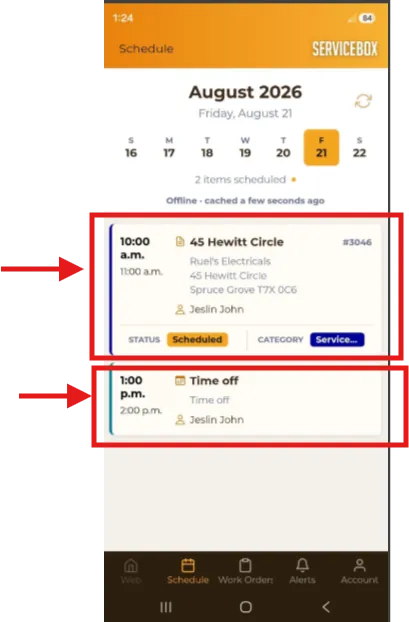
To automate technician scheduling and dispatch, field service businesses should begin with one system for customer requests, work orders, technician schedules, and mobile job updates. Set clear rules for job priority and recurring maintenance. Use software with automated scheduling to support assignments and visibility while dispatchers still confirm skills, workload, site access, and customer promises.
Step 1: Create a Work Order for Every Service Call
When a new job comes in, log the service request with the customer, job site, equipment, priority, and notes. Keep unassigned jobs visible. An open work order is safer than an urgent task in a group text or voicemail. This is the first step in service call scheduling.
Step 2: Use a Shared Technician Scheduling Calendar
Open the full schedule before moving a person. Use the shared calendar to help dispatchers manage technician schedules by checking availability, work already booked, travel time, and the skills needed. With ServiceBox, the office can drag work orders to the calendar and change assignments when plans change. This also makes it easier to assign work across multiple teams.
Step 3: Send Work Details to the Mobile Workforce
Give field technicians the address, site contact, job details, safety instructions, and equipment history in the mobile app. Work-order updates can help the office and field teams use one version of the job instead of making extra phone calls.
Step 4: Make Recurring Maintenance Scheduling Repeatable
Set up monthly, quarterly, or seasonal maintenance schedules. Use a saved work-order template and check upcoming visits. In ServiceBox, the Schedule Work Order setting needs to be selected for a recurring work order to appear automatically in the calendar. If not selected, the work order is still created but needs to be booked by dispatch.
Step 5: Keep the Dispatcher in Control
Some field service tools offer route planning and automated assignments. ServiceBox does not automatically choose the nearest technician or optimize routes, and unlike manual scheduling that can rely too heavily on memory, spreadsheets, or calls, shared software visibility helps the office work from the same information. The dispatcher still picks the right job assignment. That is important for complex field operations such as commercial rooftop HVAC, licensed electrical work, and plumbing emergencies. The dispatcher reviews technician locations together with job requirements before deciding on the assignment.
A Quick Daily Dispatch Plan for Efficient Operations
At the start of the day, review open customer calls, scheduled work, technician availability, and parts. Check for double bookings and gaps. Let field service teams confirm their plans.
During the day, record new service requests, review schedule changes, notify the right people, and keep deferred work orders visible. When an emergency call comes in, review the full schedule before assigning a technician. A shared schedule improves real time visibility, but it still needs clear decisions.
Before closing, confirm completed jobs, labour time, materials, customer signatures when needed, and follow-up work. Keep job costs and work status connected to the correct work order so invoicing and payment processing can follow a completed service visit.
Job scheduling is working when customer satisfaction improves, technicians have realistic days, and fewer jobs are lost between the office and field. Watch on-time arrivals, overtime, repeat visits, travel time, and unassigned work. Speak with technicians too. A full calendar does not always mean efficient operations.
What Is the Difference Between CRM and FSM Software?
CRM, or customer relationship management software, helps track customer records and sales contacts. FSM software, or field service management software, helps a field service business manage service appointments, customer details, job management, technician schedules, mobile job forms, and field operations. Some systems combine both types of work.
When you compare field service management solutions, look for customer history, maintenance scheduling, job tracking, mobile access, inventory management, and accounting handoffs. The right field service management software should support reliable service delivery without adding more manual data entry.
Field Service Dispatch Software: What Makes a Good Dispatch Board?
Field service dispatch software helps the office assign jobs, track job status, and update technician schedules in one place. Unlike a basic calendar, a dispatch board can connect each visit to the customer, work order, and job site. That makes field service scheduling easier when plans change.
Check technician capacity and skills
Before you assign jobs, look at who is free, how long the work may take, and which skills it needs. If a sick technician cannot work, review every job on that person's calendar. Check technician capacity, travel time, parts, and site access before moving appointments. This helps avoid scheduling conflicts and puts technician expertise to good use.
Keep service scheduling software connected
Good service scheduling software should work with your existing systems, including customer records, work orders, and accounting software. A technician mobile app should show the latest job details. Give the office and field team clear training resources so everyone knows how to report delays and complete jobs.
Understand automated scheduling before buying
Some field service scheduling software offers automatic route optimization, GPS tracking, or a schedule assistant. Others focus on drag and drop scheduling and a clear dispatch board. Some support automated work order creation for planned maintenance scheduling. Ask the vendor what is automatic and what your dispatcher must decide.
ServiceBox does not automatically select the closest technician or optimize routes. It gives your dispatcher the information needed to choose the right technician and keep customers informed. A reliable process and clear customer communication can also help control operational costs without putting extra pressure on the crew.
How Field Service Scheduling Software Helps Your Team
Good processes come first, but they are much easier to maintain when everyone uses the same information. Field service scheduling software is more than just a calendar, helping service businesses move away from disconnected spreadsheets, paper work orders, and constant phone calls to coordinate work across the entire business and streamline field service operations. That matters for service organizations that need to manage changing field demands consistently.
See Your Field Operations in One Schedule
The ServiceBox drag-and-drop dispatcher helps office staff review technician availability, assign jobs, and spot gaps or overlaps. That creates real time visibility into field service operations. Some scheduling tools include GPS tracking, but ServiceBox uses available technician location context when tracking is enabled; it does not automatically optimize routes. Good scheduling solutions help dispatchers review technician schedules and make informed assignment decisions.
ServiceBox supports drag-and-drop scheduling and dispatch. When a work order is placed on the schedule, the dispatcher should review the time block and assigned technician. For example, a newly dragged work order may start with a one-hour default duration, so longer jobs need to be adjusted.
Connect Scheduling to Work Orders and Mobile Access
A calendar entry on its own says very little about the job. Field service management software connects the appointment to work order details, customer history, job notes, labour, materials, and real time job tracking.
ServiceBox lets technicians use a technician mobile app and mobile work orders to review scheduled work, record progress, and capture information that gives the office real time data. That helps reduce manual data entry and gives dispatchers a clearer picture of which jobs are complete or still need attention.
Keep Recurring Work, Time Tracking, and Billing Connected
When maintenance visits, timesheets, and invoices are managed separately, small gaps can turn into missed work or delayed billing. Connected field service management solutions make it easier to follow the job lifecycle from scheduling to completion.
ServiceBox supports recurring work orders, technician time and material tracking, and accounting integrations that include supported workflows with QuickBooks Online and Sage 50 Canada. The aim is not just more efficient operations on the calendar; it is a cleaner handoff after the technician finishes the job, with invoicing fitting into a connected billing workflow. Canadian businesses also need appropriate tax documentation: the Canada Revenue Agency's GST/HST invoicing guidance explains disclosure requirements for taxable supplies.
ServiceBox is a scheduling and dispatch platform, not a promise of automatic closest-technician assignment or automatic route optimization. Your dispatcher still chooses the right person and confirms changes.
What a Better Scheduling Day Looks Like
Imagine a Canadian commercial service company with eight field technicians and four people handling management, administration, and customer calls.
At 7:30 a.m., the dispatcher reviews scheduled work orders, available technicians and their location tracking or schedule status, parts delays, and any recurring maintenance coming due. Everyone starts with an accurate plan.
At 9:00 a.m., a commercial customer calls about failed heating equipment. The dispatcher checks the required skills and current workload, assigns a suitable technician, and contacts the customer whose flexible visit must move.
By midday, another technician reports that a repair will take longer than planned. The office adjusts the next appointment and updates the affected customer before the promised time passes.
Before closing, the team checks completed work, time entries, outstanding parts, and return visits. Tomorrow's unscheduled jobs are visible, rather than buried in a voicemail or someone's notebook.
The difference is not that nothing unexpected happened. It is that the whole team had a clear way to respond, which is especially useful in complex field operations.
How Better Scheduling Prevents Missed Appointments
A service call can be missed even when it is on the calendar. The technician may not see a change, the job may take longer than planned, or a site may have strict access hours. Field service scheduling software helps prevent these gaps by putting the appointment, job details, and technician status in one shared place.
Three simple habits make the biggest difference:
Confirm the service window. Give the customer a time your crew can reasonably meet. Include travel and building access time.
Log changes as soon as they happen. When a technician reports a delay or an urgent job comes in, update the schedule and check which other jobs are affected.
Tell the customer before the appointment is missed. Give a new arrival window if the plan changes. Proactive customer communication helps protect trust and customer satisfaction.
For example, if a commercial plumber needs an extra hour at a leaking pipe, the office should review the next appointment before the original arrival window passes. A quick customer update is better than leaving the site waiting.
How Can You Improve First-Time Fix Rates?
A first-time fix means the technician completes the repair without needing another service visit for the same issue. Better scheduling helps because the dispatcher can match the work to a qualified person and check that the right parts, tools, and site information are ready.
Before assigning a complex HVAC, plumbing, or electrical job, review the technician's qualifications, past work at the customer site, equipment history, and available materials. A job that needs two technicians should not be squeezed into one person's calendar.
If the required part is not ready, tell the customer what can be done on the first visit and plan the return work. It may be better to book a proper repair time than send a technician who cannot finish the job. This keeps the job status clear and reduces avoidable repeat trips.
ServiceNow's field service management guide also identifies skills, parts, task status, first-time fix rate, and travel time as important parts of field service operations.
What Is Dynamic Scheduling, and Is It the Same as Automatic Dispatch?
Dynamic scheduling means changing the day's plan when real work changes. A technician calls in sick. A customer cancels. An emergency call arrives. Or a repair runs longer than planned. The dispatcher looks at current capacity, moves work when needed, and keeps customers informed.
Automated dispatch is different. Some field service software can choose technicians or optimize routes using rules. Some platforms also include schedule optimization to rework assignments as conditions change. Not every platform offers those features. For example, ServiceBox supports a drag-and-drop dispatch board, work-order alerts, shared job updates, and recurring work-order scheduling, but it does not automatically choose the closest technician or optimize driving routes.
To make schedule changes easier, agree on a clear order of steps: record the new request, check skills and capacity, decide what can safely move, assign the right technician, and update the customer. If a technician is sick, recheck every assigned job, not only the first appointment.
This helps a dispatch team handle real-time changes without treating every new customer call as a crisis.
Which Technician Scheduling Numbers Should You Watch?
Use a few simple measures to see whether field service scheduling is helping the business.
Measure | What it tells you | How to improve it |
|---|---|---|
On-time arrival rate | How often a technician reaches the job during the promised window | Allow realistic travel and contact customers early about delays |
First-time fix rate | How often a repair is completed without a return visit for the same issue | Match technician skills and confirm parts before dispatch |
Technician utilization | How much available work time is spent on useful scheduled jobs | Reduce long gaps, unnecessary travel, and overbooking |
Travel time | How much of the day is spent moving between customer sites | Group nearby jobs when skills and commitments permit |
Unassigned backlog | How much requested work has no booked technician | Review the open work-order list every day |
Track these numbers for a few weeks before you make big changes. The aim is continuous improvement, not keeping every technician busy every minute. A useful schedule gives people enough time to do safe, good work and gives customers a service window they can trust. | ||
ServiceNow's service scheduling overview explains how technician skills and job assignments affect scheduling decisions. |
How Do You Know Technician Scheduling Is Improving?
Start by tracking a few measures that connect office planning to technician experience and customer satisfaction. You do not need a complicated dashboard to learn what is going wrong.
Measure | What to watch |
|---|---|
On-time arrival rate | Are technicians meeting promised customer windows? |
Jobs completed as scheduled | Are daily plans realistic? |
Overtime hours | Is work spread fairly across the team? |
Travel time between jobs | Are service territories planned sensibly? |
Repeat and return visits | Are skills, parts, and job details ready the first time? |
Unscheduled work orders | Is requested work being booked or forgotten? |
Same-day schedule changes | Are changes becoming manageable or constant? |
Review your starting point, make one or two changes, and compare results after a month. Combine scheduling data with technician feedback, since a calendar can look full and efficient while still making the day harder for the people on site. |
A Simple 30-Day Plan to Improve Job Scheduling
You do not have to rebuild your entire field service business at once. A few consistent habits can make service operations more predictable.
Week 1: Find the friction. Review late jobs, repeat visits, overtime, and the reasons technicians call the office. Ask your team which information is usually missing.
Week 2: Set scheduling rules. Agree on job priorities, realistic time blocks, technician qualifications, and how emergency work is handled.
Week 3: Improve the handoff. Standardize work-order details and make sure office staff and field teams use the same schedule.
Week 4: Review and adjust. Look at on-time service, workload balance, and unfinished work. Keep the changes that helped and improve the ones that did not.
If you are comparing field service software, look beyond the monthly service management software cost. Consider the time spent coordinating customer requests, chasing timesheets, and entering the same job information twice.
What Should Canadian Contractors Look for in Scheduling Software?
The right scheduling software depends on the way your crew actually works, and buyers comparing basic schedulers should also know when they need broader field service dispatch software. A small service business with six technicians has different needs from a contractor running several commercial crews across multiple cities, and those needs also vary across different service industries.
Look for these key features to help dispatchers build efficient schedules based on real working conditions:
A visual calendar showing technician schedules and unscheduled work.
Flexible job assignment for individuals and multi-person crews.
Mobile access to customer details, job sites, and equipment history, with available technician location context, when tracking is enabled, to support dispatch decisions without assuming automatic route optimization.
Recurring maintenance scheduling and follow-up job tracking.
Time and material capture connected to work orders.
Configurable user access and practical support for mobile connectivity.
Accounting integration that fits your Canadian workflow, including QuickBooks or Sage 50 Canada where relevant.
Some buyers may prefer broader workforce management capabilities when they need scheduling, communication, time tracking, and oversight for deskless teams across multiple sites.
The strongest field service tools should make a normal busy day easier to manage. For companies operating in Canada, it also helps to choose a platform built for Canadian contractors and their local accounting workflows. Ask for a demonstration using your real scheduling challenges, not just a perfect sample calendar. Compare scheduling tools based on a real service day, not a list of features your crew may never use.
Frequently Asked Questions About Technician Scheduling
What Is the Best Way to Schedule Field Service Technicians?
The best approach is to prioritize incoming work, match jobs with qualified technicians, allow realistic time for travel and completion, and use a shared schedule. Recheck assignments when emergency calls or delays affect existing customer promises.
What Is Field Service Scheduling Software?
Field service scheduling software helps dispatchers plan service appointments, assign technicians, and keep work orders linked to the calendar. Depending on the platform, it may also use technician skills, availability, and location to help create the most efficient schedules, while connecting customer history, recurring visits, mobile job updates, time tracking, invoicing, and customer management, depending on the product and how the service company is set up.
How Do You Schedule 10 to 30 Technicians?
Group your team by qualifications, crews, or service territory where useful, and keep all bookings on one shared calendar. Give dispatchers clear rules for job priorities, emergency work, travel time, and customer updates so decisions remain consistent as the team grows.
Can Scheduling Software Help Improve Customer Satisfaction?
Yes, when it helps your office make realistic promises and communicate changes promptly. Better schedules can reduce missed appointments, keep technicians prepared, and give customers a more dependable service experience. Software supports the process, but accurate information and follow-through are still essential.
Can ServiceBox Schedule Recurring Maintenance Jobs?
Yes. ServiceBox supports recurring work orders for planned service visits. Configure the repeat interval and the calendar scheduling option appropriately, then review upcoming work to confirm each visit is assigned as intended.
Does ServiceBox Automatically Send the Nearest Technician?
No. ServiceBox offers scheduling and dispatch tools, but the dispatcher chooses the technician and confirms the assignment. Location and job requirements should be reviewed together rather than assuming the nearest person is the best fit.
Better Schedules Make for Better Service Days
Your technicians should not have to guess where they are going, and customers should not have to chase the office for arrival updates. Good field service management starts with a schedule that reflects real jobs, real travel, and the people doing the work.
For Canadian HVAC, electrical, and plumbing contractors, the biggest improvements often come from clear priorities, complete work orders, balanced workloads, and one shared place to manage changes. ServiceBox brings scheduling, dispatch, mobile work orders, job information, and connected financial data together to help your team stay organized as the business grows.
Want to see how ServiceBox could work for your team? Book a ServiceBox Demo and bring a real example of a busy service day. We will show you how to plan it in ServiceBox.