
Keep scheduled service visible
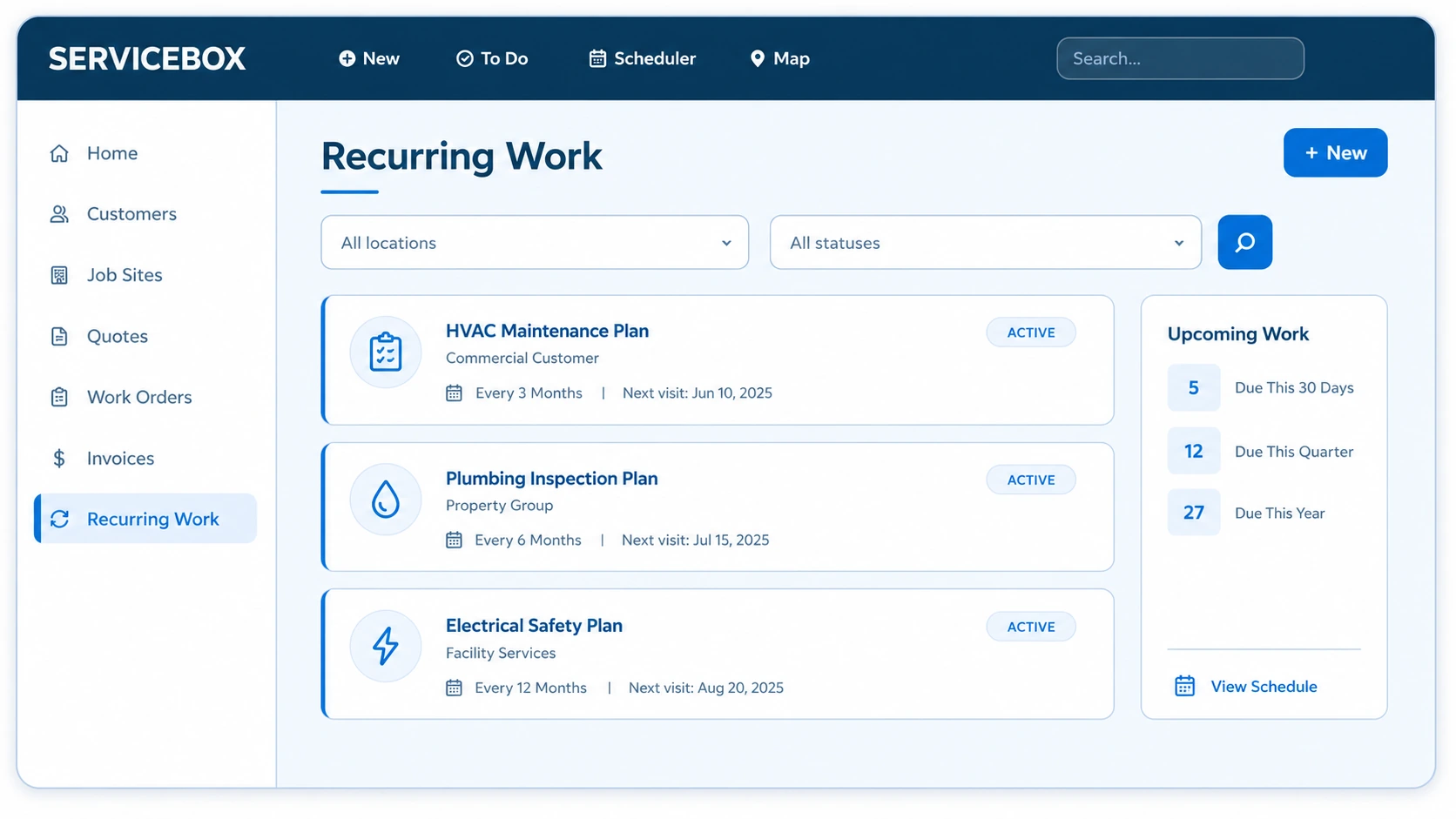
Generate recurring work from configured schedules and keep upcoming maintenance visible to dispatch.
Field service maintenance management
Automate recurring work orders, keep equipment history at hand, and connect each maintenance visit to scheduling, field documentation and billing. Built for commercial HVAC, plumbing, electrical and multi-trade contractors.
Preventive maintenance software
ServiceBox helps commercial contractors manage preventive maintenance agreements from recurring work-order generation through scheduling, field completion, equipment history, billing and renewal. Each agreement can stay connected to the customer, job site, equipment, service frequency, expected scope and technician workflow.
Best preventive maintenance software
The best fit depends on your agreements, customer sites and field workflow. Look for recurring work orders, equipment history, technician checklists and a clear handoff to invoicing. ServiceBox connects these in one field-service workflow for commercial HVAC, plumbing, electrical and multi-trade contractors.
Customer proof
Apex uses ServiceBox across scheduling, recurring maintenance, equipment history, field documentation, time and invoicing for commercial and institutional plumbing and HVAC work.
Read the Apex customer story →The operational outcome
Field Service Preventative Maintenance Software connects contract terms, job sites, equipment, recurring schedules and technician work so scheduled service happens consistently without adding administrative complexity.
Generate recurring work from configured schedules and keep upcoming maintenance visible to dispatch.
Give technicians the correct checklist, equipment history and required service details.
Manage more agreements, service intervals and renewal dates without scaling paperwork.
Inside preventative maintenance management
Each maintenance record stays connected to the agreement, customer, job site, equipment and work order around it, giving the office and field one source of truth.
Store contract terms, coverage, renewal dates and customer commitments with the correct account and service locations.
Office teams can see what is included before scheduling, billing or discussing renewal.
Configure monthly, quarterly, seasonal, annual and equipment-specific recurring maintenance schedules.
Different assets and locations can follow the cadence promised in each agreement.
Generate future work orders from the maintenance schedule instead of recreating each visit manually.
Upcoming work reaches scheduling early and fewer contracted visits are missed.
Track upcoming service and renewal dates, with reminders supporting customer and internal follow-up.
Dispatch and account owners can act before a visit or agreement falls through the cracks.
Standardize inspection steps, required readings, forms and completion requirements for recurring visits.
Customers receive more consistent service regardless of which qualified technician attends.
Keep completed maintenance, notes, photos, readings and recommendations connected to each serviced asset.
Future visits can start with the history and condition recorded by previous technicians.
Identify parts, filters and materials commonly required for upcoming recurring work.
Purchasing and technicians can prepare before arrival and reduce avoidable return trips.
Give field teams schedules, equipment history, checklists, documents and job details on supported devices.
Technicians can complete the work and documentation without returning to the office.
Review scheduled versus completed visits, labour, materials and follow-up items from one connected workflow.
Managers can spot missed work, incomplete documentation and margin concerns earlier.
Track contract expiration, service performance and customer history before renewal conversations begin.
The team can protect recurring revenue and identify opportunities to grow maintenance coverage.
One connected workflow
Illustrative example: a commercial HVAC contractor services three buildings under one maintenance agreement. Each site keeps its own equipment details and service history.
Record the equipment and agreed scope for each building. Set the service frequency and identify work that needs separate approval.
Generate recurring work orders. Dispatch reviews due visits, confirms site access and assigns the right technician.
The technician reviews equipment history, completes the checklist and records notes, photos, labour, materials and follow-up findings.
The office reviews completed work before invoicing. Use site history and outstanding recommendations to prepare the next visit and renewal.
Configuration and adoption
ServiceBox onboarding maps agreement terms, equipment, intervals, checklists, materials, scheduling rules and renewal ownership before recurring work goes live.
Confirm which customers, job sites and equipment belong to each maintenance agreement.
Set the recurring cadence, timing windows and work order generation rules for each program.
Build the field steps, documentation and common material requirements each visit needs.
Run representative maintenance cycles before go-live and confirm who reviews completion and renewals.
Clear expectations
Reliable recurring service depends on clear contract data, equipment relationships and assigned ownership for exceptions, completion review and renewals.
Questions contractors ask
Configure recurring work orders around your service intervals, sites and equipment. Each visit can carry the relevant scope and checklist, while completed work builds the history your team uses at the next service.
Technicians can review customer, job-site and equipment context during service calls, document recommendations and identify additional maintenance needs. The office can use that information for follow-up, upsells and expanded contract coverage.
Choose software that can plan repeat visits by customer, job site, equipment and service interval while keeping the dispatcher in control of technician assignments. ServiceBox supports configured recurring work orders, equipment and job-site records, service checklists and technician documentation. Review your contract and scheduling requirements during a demo to confirm fit.
Yes. ServiceBox connects maintenance agreements to customers, job sites, equipment, configured service intervals, recurring work orders, technician workflows, completed service records, billing context and renewal follow-up. This makes it well suited to commercial HVAC, plumbing, electrical and multi-trade contractors managing recurring service across multiple customer locations.
Look for a clear handoff from recurring work-order generation to dispatch, field completion, office review and follow-up repairs. ServiceBox can generate work orders from configured maintenance schedules; office staff still assign technicians, manage exceptions and review the work before billing. The appropriate setup depends on your service frequencies and agreement terms.
ServiceBox supports recurring maintenance contracts for commercial service contractors by connecting agreement details, service intervals, customer sites, equipment, recurring work orders, scheduling, technician completion, billing context and renewal follow-up in one workflow. It is designed for HVAC, plumbing, electrical and multi-trade teams managing repeat service across multiple customer locations.
Yes. ServiceBox can generate future work orders from a configured preventative-maintenance schedule so office staff do not have to recreate every contracted visit manually. Each recurring work order can remain connected to the customer, job site, serviced equipment, expected scope and maintenance checklist, then move into scheduling and dispatch for assignment to the appropriate technician.
Built For Canada
ServiceBox is Built For Canada, shaped around the day-to-day realities of commercial service businesses. That means workflows built for customer sites, equipment history, recurring service, field teams, invoicing and Canadian accounting—not a generic US-first system your team has to work around.
See why ServiceBox is Built For Canada →.webp)
From commercial HVAC and plumbing to electrical and multi-trade teams, ServiceBox connects the full service workflow while supporting Canadian needs like Sage 50 Canada handoffs and human implementation support.
No generic product tour
Bring a real contract, service interval, equipment list or renewal exception. We will map the complete preventative maintenance workflow and show what should be configured.