
Capterra review
“I love that everything is in one location & we've gone completely paperless.”
Job software for Canadian electrical shops
Service calls and panel jobs on one customer record. The electrician closes the work order on site, the office reviews it once and the invoice builds from it. Books in Sage 50 or QuickBooks, your ServiceBox bill in Canadian dollars.
4.3/5 across 168 Capterra reviews2026 Capterra Shortlist·Software Advice Frontrunner
Sage 50 Canada and QuickBooks · Canadian dollars · Built in Regina
Watch: how Croft Electric runs field and office on ServiceBox.
Sage 50 Canada and QuickBooks
Invoices hand off to Sage 50 Canada, QuickBooks Desktop or QuickBooks Online.
Canadian dollars
Priced and billed in Canadian dollars.
Built in Regina
Built and supported in Regina, Saskatchewan.
Quote to invoice
Quoting
Build the electrical quote with scope, labour, materials and exclusions, from the office or from the truck. When the customer approves, the quote becomes the work order with the scope and pricing already on it.
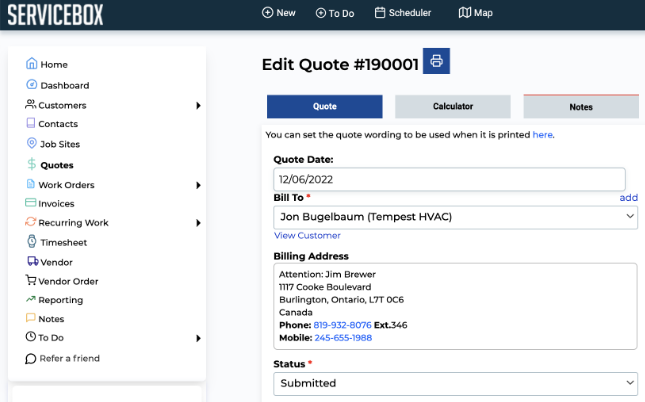
The problems we fix for electrical shops
Quotes rebuilt from scratch every time
Templates and a shared price list for the panel upgrades, service calls and installs you quote every week.
Approved scope that never reaches the crew
The approved quote carries into the work order, so the electricians see the scope the customer signed off on.
Quotes that sit in an inbox
Sent, viewed, approved and outstanding quotes are visible, so the office knows which ones need a call.
Scheduling and dispatch
Drop the call on an electrician with capacity. Customer, site contact, panel details and prior work go with it, and the board moves by drag and drop.
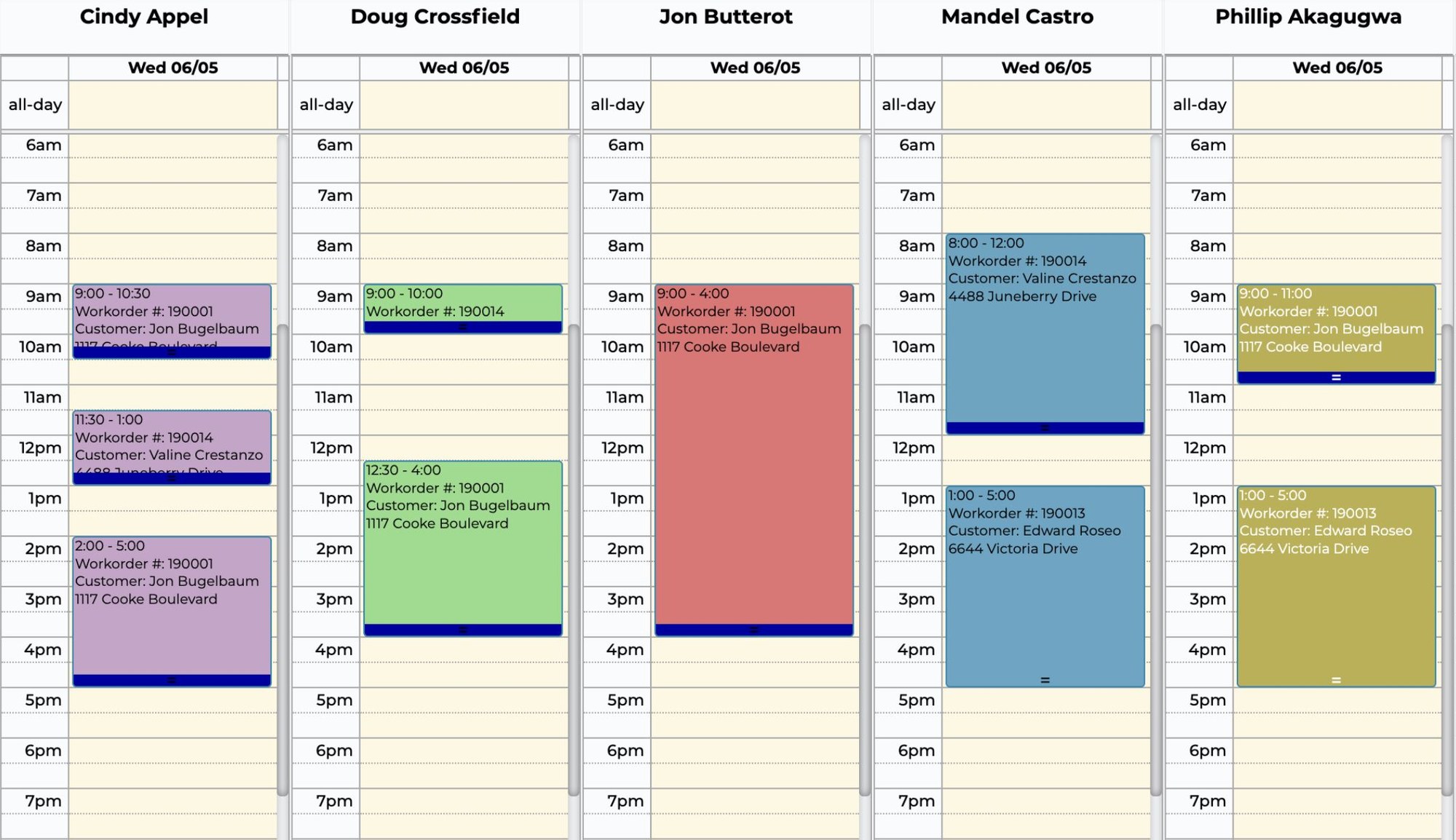
The problems we fix for electrical shops
Faults and outages that cannot wait
Dispatch urgent calls with the customer, site and system history already visible.
Techs leaving without the job details
Drop the work order on the tech and the site contact, access notes, panel details and prior work go to the truck.
Multi-day jobs that wreck the schedule
Plan crew capacity and multi-day assignments on the dispatch board without rebuilding the schedule.
Work orders and mobile
The electrician records labour, materials, photos, forms and scope changes on the dispatched work order while on site, so nothing waits for the end of the week.

The problems we fix for electrical shops
Scope changes nobody wrote down
Field notes, approvals and photos are kept when the scope changes.
Labour and materials that never hit the job
Each electrician's time and job-linked material costs track across service calls and projects.
Panel and circuit notes that go missing
Panel details, circuit notes, diagrams, photos and prior work stay with the site.
Invoicing and accounting
Completed work comes back from the dispatch board for one review, then the invoice, without rebuilding the job from paper notes. Supported records hand off to Sage 50 or QuickBooks.
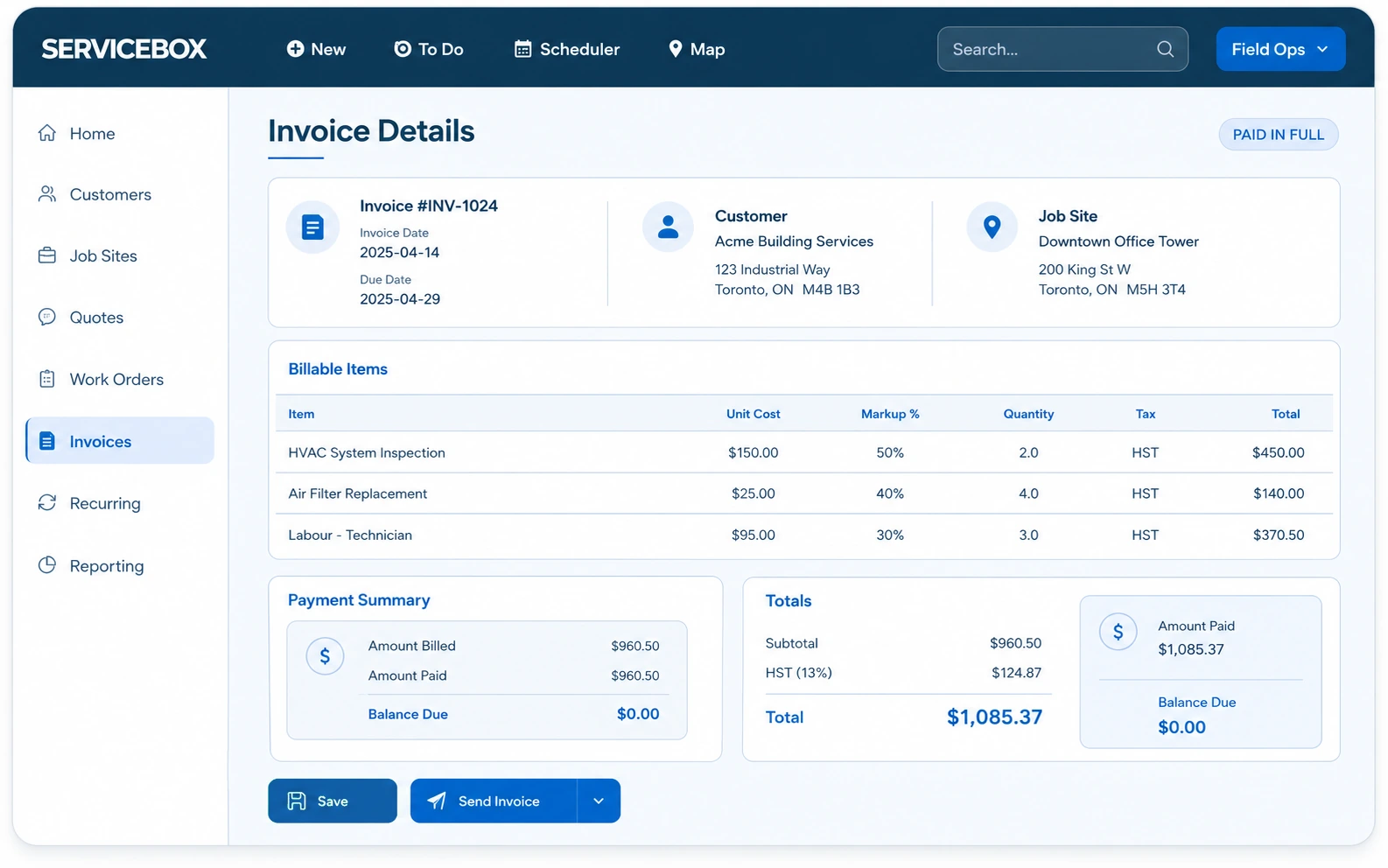
The problems we fix for electrical shops
Progress billing done from memory
Labour, materials and field evidence tie to the work performed before invoicing.
Invoices rebuilt from paper notes
Completed job details move into billing without re-entering the same details.
Books that need re-keying
Invoices hand off to Sage 50 Canada, QuickBooks Desktop or QuickBooks Online.
Reviews
.webp)
Customer story · Electrical
Croft Electric connected scheduling, mobile work orders, time cards and billing in ServiceBox for a field team that kept growing.
“I love that everything is in one location & we've gone completely paperless.”
“It has proven easy for our Technicians and Admin team to utilize and our Customers get a great end product too.”
ServiceBox is easy to use, highly configurable and supported by a friendly team that continues to check in.
Capterra and Software Advice share a Gartner Digital Markets review pool, so their review counts are not combined. Summarized reviews are clearly labelled.
Accounting integration
Run your jobs and prepare invoices in ServiceBox. Supported records hand off to the accounting software you already use.


QuickBooks Online · QuickBooks Desktop · Sage 50 Canada
ServiceBox runs
Jobs, work orders, labour and materials, invoices and payment status.
Your books stay in
QuickBooks or Sage, which stays the financial system of record.
Running Sage 300 Premium, or not sure about your setup? We confirm how ServiceBox works with it on the demo.
How the handoff works
Close the job
Labour, materials, purchases, notes and changes are on the work order.
Review before billing
Billing checks the completed job, not paper, texts or spreadsheets.
Create the invoice
It stays connected to the customer and the job, with invoice and payment status tracked.
Hand off to your books
Supported records move into QuickBooks Online, QuickBooks Desktop or Sage 50 Canada after review.
Set up with you. Accounting mapping and test transactions before go-live.
Book a demoProTrades Mechanical · Windsor, Ontario
“A great bridge between the way we like to work, and how ServiceBox works.”
Jennifer MacDonald, ProTrades Mechanical
A Windsor, Ontario shop running its invoicing straight through to Sage 50.
Read the ProTrades storyThe platform
Dispatch leads the day. Add purchasing, inventory and locations as the shop grows.
Scheduling & dispatch
Every tech's day on one board, with the job details before they arrive.
Customers, sites & equipment
Full history connected and easy to find.
Work orders & mobile
Record time, materials, forms, photos and notes on site.
Recurring maintenance
Recurring work orders schedule repeat visits and keep service history with each job.
Quotes & invoicing
Move from approved quote to completed work to invoice, with less re‑entry.
Timesheets & payments
Track field time and payment activity alongside the work.
Purchasing & inventory
Tie suppliers, purchase orders and material costs to each job, and track stock across warehouses and trucks.
Multi-location operations
Manage branches, teams and schedules in one system.
Features vary by plan. The demo is tailored to your shop.
Before the demo
Yes, for quoting and invoicing. Quotes, work orders and invoices live in ServiceBox on one record per job. Your books stay in Sage 50 or QuickBooks and the invoices hand off to them.
Plumbing, heating, electrical and multi-trade shops all run on it. Every trade's work orders sit on the same drag and drop dispatch board.
Yes. Techs record time, materials, photos, forms and notes on the mobile app while on site, and saved work stays reachable when the signal is weak.
It depends on how many techs, customers and service agreements you bring over. You get help setting up, bringing over your data and training the office and the techs, and support stays with you as the team grows. The demo walks through the timeline for a shop like yours.
No. Canadian shops are priced and billed in Canadian dollars.
No. ProTrades Mechanical runs on ServiceBox from Windsor, Ontario, with the same Regina team behind it.
Book a demo
We look at how you schedule, bill and hand off to your books today, then what getting started takes. You'll see how to: